Role
Lead Product Designer
Time Frame
May - July 2021
Context
S&P Global Market Intelligence was in the process of migrating sustainability data onto its core platform. For years, environmental data had been distributed as static PDF reports through an acquired external platform. As S&P brought these datasets in-house, they were each designed in isolation, squeezed into existing page templates without a cohesive design strategy.
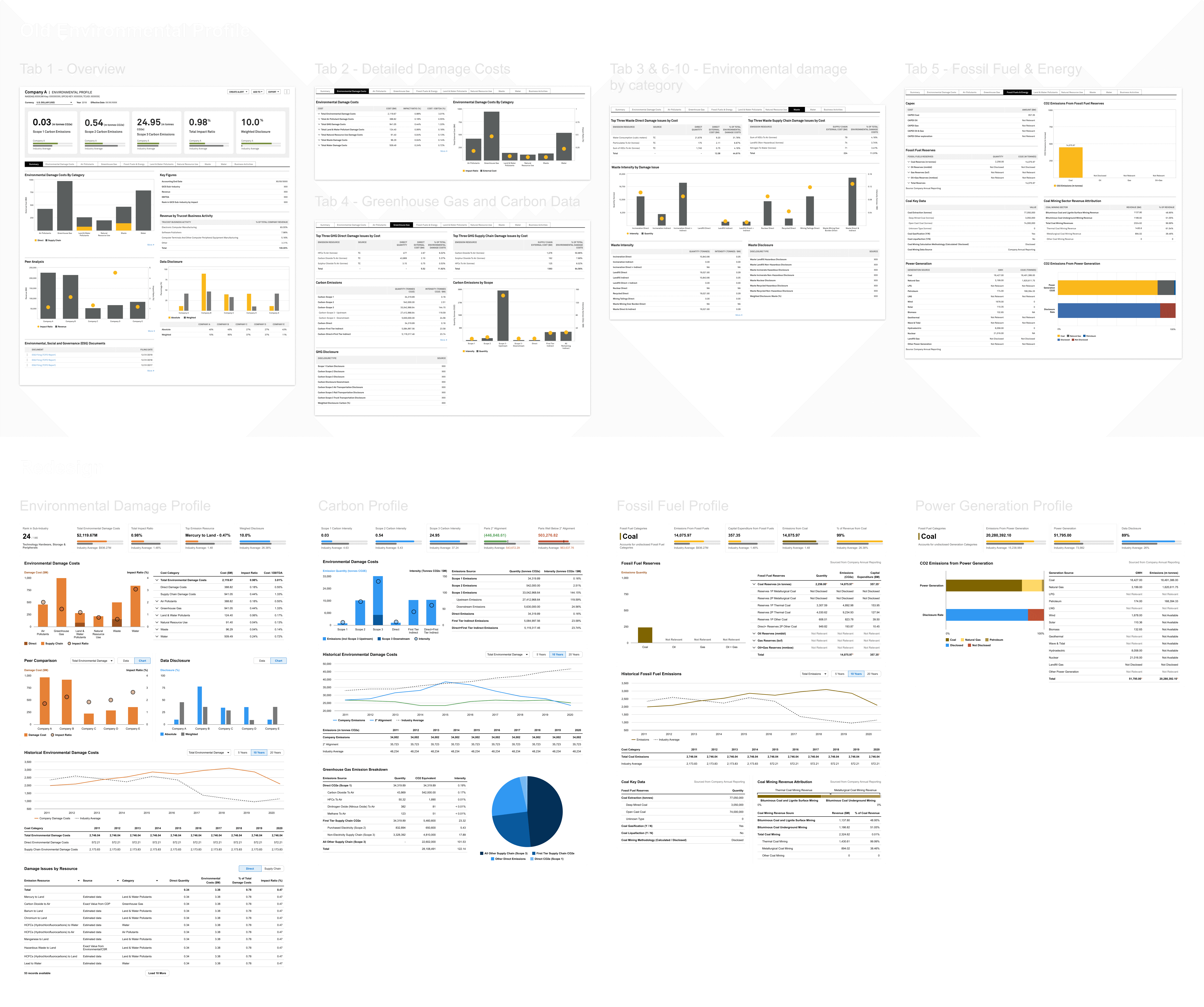
When I stepped into the lead designer role for ESG datasets, the cracks were already showing. Pages were dense and disorganized. Navigation patterns varied from dataset to dataset. New content was being jammed into existing profiles rather than given its own space. There was no shared visual language, no scalable structure, and no consistency in how metrics were presented. We needed to fix it by presenting a cohesive and visually aligned dashboards.
This is the story of how I got there, starting with one overloaded profile.
My Role
This was my passion project. As I took over as Lead Designer for our ESG datasets I started seeing issues both in how datasets had been implemented and how those designs would extend to new datasets. As new datasets came through the ideas started to simmer I started to shape a vision of how we could unify the disparate data sets.
Persona
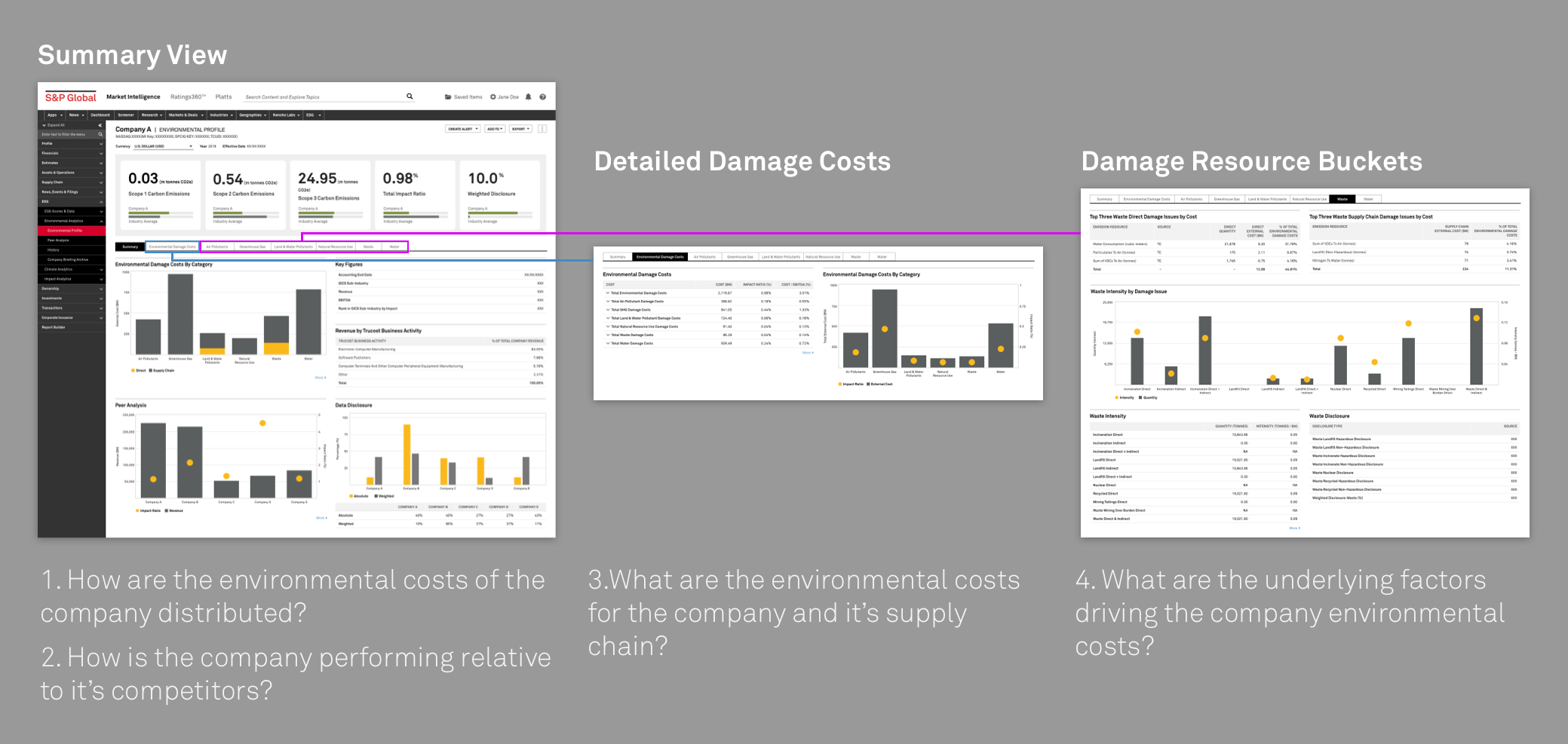
All the datasets were primarily being catered to Investment Bankers and ESG Specialists as part of their investment process. The environmental profile, specifically, was answering four key questions:
How does a company impact the environment?
How does it affect their bottom line?
How do the costs compare to the industry and peers?
What are the sources of that cost?
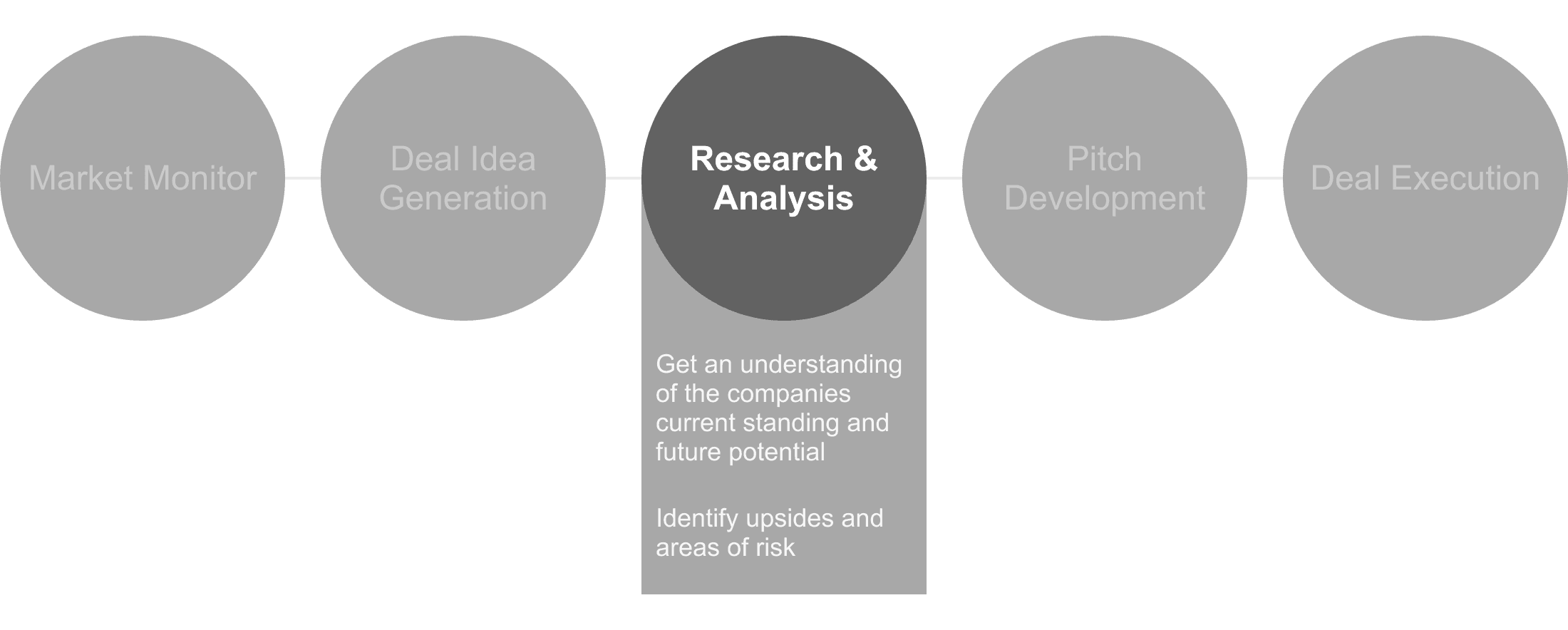
Answering these questions will inform investment decisions in the research & analysis part of the investment workflow.
The Environmental Profile
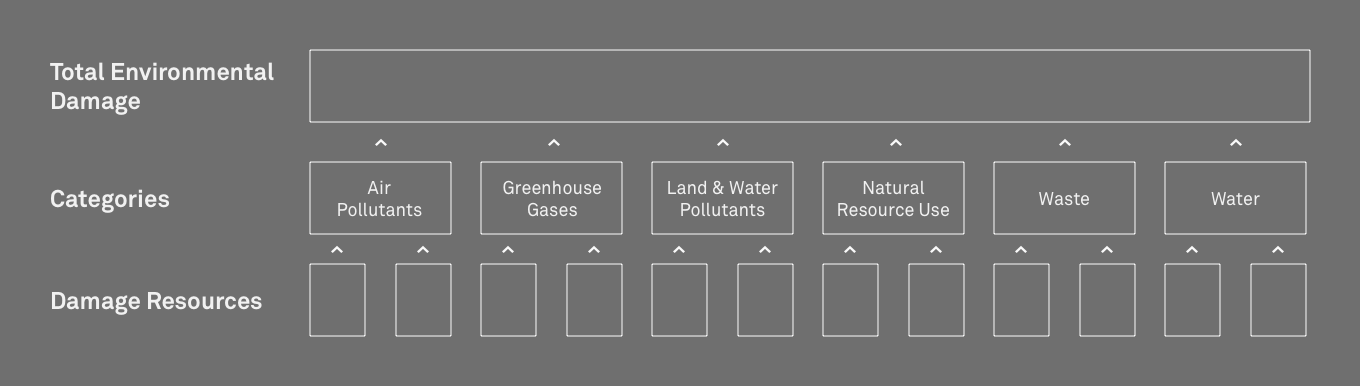
The Environmental Profile was the first sustainability-specific dataset to launch on the Market Intelligence platform. It provided an overview of how companies impact the environment, translating ecological damage into financial cost. The data covered six categories of environmental impact: Air Pollutants, Greenhouse Gas, Land & Water Pollutants, Natural Resource Use, Waste, and Water, and rolled them up into a total damage cost figure.
It was meant to answer the jobs-to-be-done of Investment Bankers and ESG Specialists.
The profile had originally been designed to mirror the PDF reports it replaced, using a tabbed structure to move users from high-level metrics through damage categories down to underlying resources. It was limited, but functional.
Then things started piling on. As new environmental datasets became available:
Carbon Emissions
Fossil Fuels
Power Generation
Business Activities
Environmental Filings
They were added into the Environmental Profile rather than being given their own pages. The tabbed structure buckled under the weight. The commercial team dictated tab ordering. The metrics module at the top of the page ended up showcasing carbon data that lived four tabs deep. The page that was supposed to answer four clear questions was now trying to do everything at once.
Research & Insight
I approached the problem from three angles.
Data Deep Dive
The datasets I inherited didn't come with narrative context. They arrived as raw Excel files tables and rows of environmental metrics with no framing for how they should be interpreted or presented. There were no briefs explaining what story each dataset told. Due to limited staffing on the product team, I ended up taking this on.

Sample data provided to me.
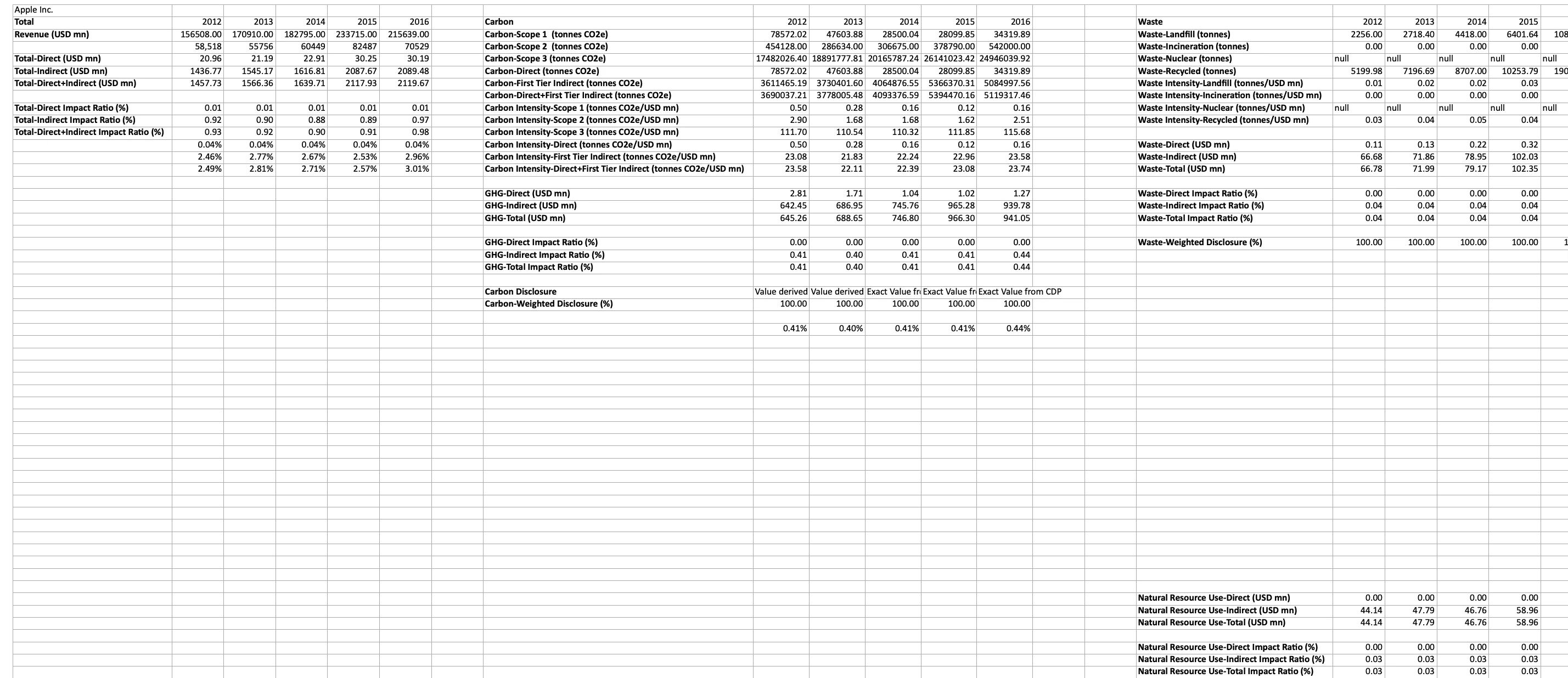
Making sense of the data in Excel.
I worked backwards from the data structure, tracing how individual metrics rolled up into categories, how categories related to each other, and where the boundaries between datasets actually sat. What I found was significant: the Environmental Profile wasn't one dataset. It was four distinct datasets with fundamentally different value propositions, all compressed into a single page. Environmental damage costs, carbon emission volumes, fossil fuel extraction data, and power generation sources each told a different story, but the current design presented them as fitting into the data structure.
Customer Feedback
Without direct access to end users, I turned to the next best source: client feedback captured in Salesforce. I analyzed over 50 client comments and complaints, supplemented by around 10 issues that had been escalated directly to our product managers. Three sentiments repeated throughout:
"The page is confusing." - 19 comments referenced general confusion with navigating or interacting with the page, without being able to pinpoint exactly why.
"How can I see all the damage costs?" - Users wanted to see every damage resource and how they ranked — not just the top three per category, which had been an early design decision intended to prevent information overload.
"Where do the metrics at the top come from?" - There was persistent confusion about how the carbon-focused KPIs at the top of the page connected to the environmental damage data below, and how carbon emissions data related to the profile at all.
Heuristic Review
With the client feedback as a lens, I conducted a heuristic review of the live page and identified several structural problems:
The tab flow was broken. The original reading order had been disrupted by the inserted datasets. Tabs no longer followed a logical progression, and the flow had only ever been implied by ordering rather than made explicit visually.

The metrics module was misleading. Stakeholders had decided that carbon emissions were the highest-value content, so the KPI module at the top of the page was dominated by carbon data. But that data lived under the fourth tab. Users saw headline metrics they couldn't trace to anything on the visible page.
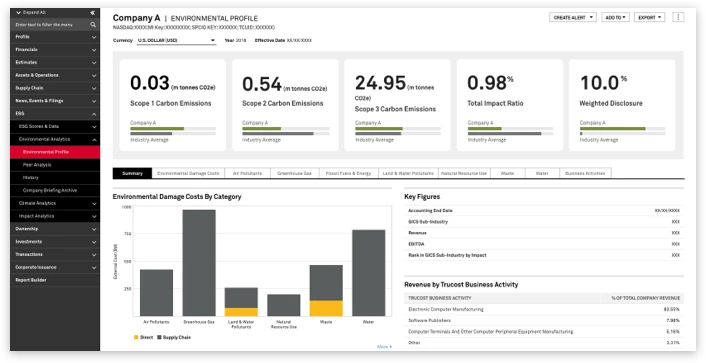
Overlapping data created confusion. Greenhouse Gas data (part of the original environmental damage dataset) and Carbon Emissions data (from a separate dataset) covered similar territory but were derived differently. No distinction was made for the user. The same was true of Natural Resource Use and Fossil Fuel data, which were offering completely separate insights. However, they were being presented in the same structure.
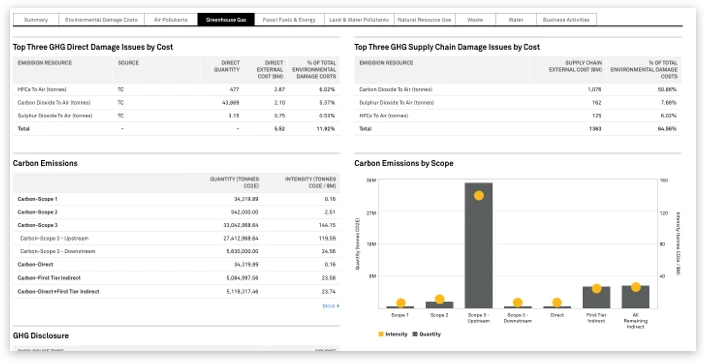
Unrelated data was bundled together. Fossil Fuels and Power Generation were part of the same dataset but told completely different stories. A fossil fuel extractor rarely generates energy and vice versa, yet they shared a tab.
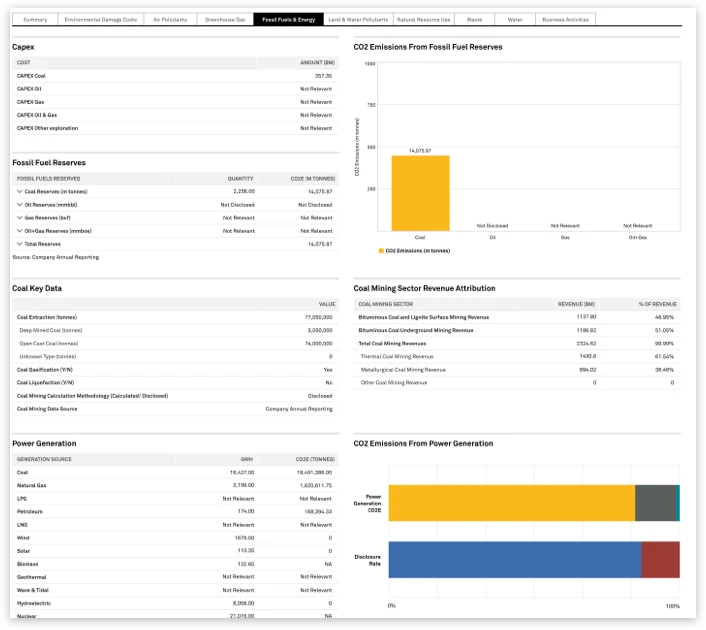
The conclusion was clear: this wasn't a page that needed better organization. It was four pages forced into one.
Jobs-to-be-Done Evolution
The Environmental Profile had been designed around four questions about financial impact from environmental damage. When I initially recommended splitting the content, the assumption was that the added datasets shared those same jobs-to-be-done. But as I dug into the data and spoke with stakeholders, I realized each dataset served a fundamentally different analytical purpose:
Environmental Damage is about financial impact: what is the environment costing this company, and how significant is that cost relative to revenue?
Carbon Emissions is about trajectory and climate alignment: how much is the company emitting, how is that changing, and where does it stand relative to Paris Climate Accord goals?
Fossil Fuels is about extraction economics: what is being extracted, what are the emissions and costs from that extraction, and what is the revenue exposure?
Power Generation is about energy mix and disclosure: what are the sources of the company's power generation, what emissions result, and how transparent is the company about it?
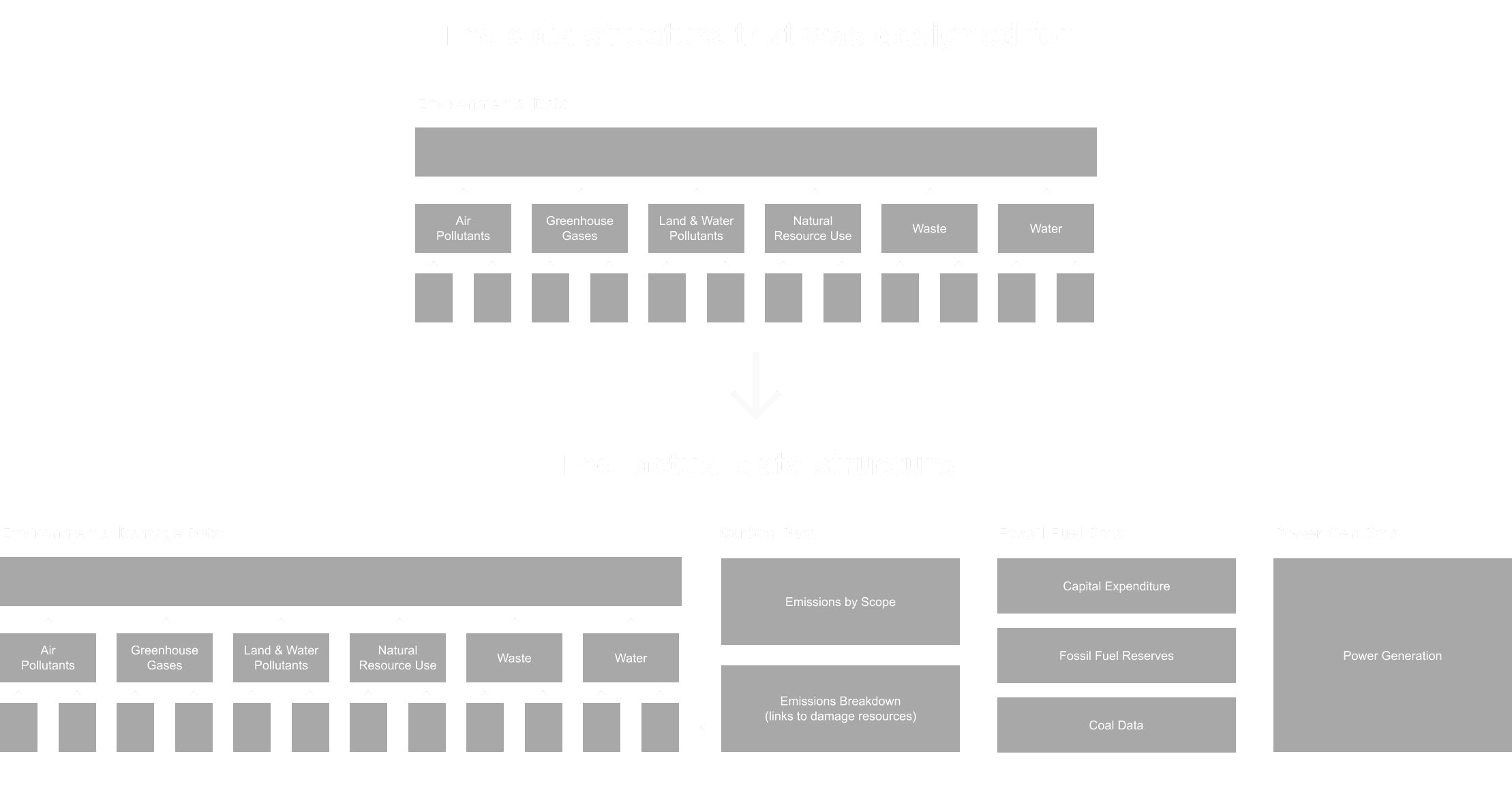
With that frame in mind, I defined the specific questions each profile needed to answer:
Environmental Damage
How does a company impact the environment?
What does it cost the company, and how significant is the impact relative to revenue?
How do the costs compare to industry and peers?
What are the sources of that cost?
How have the costs changed over time?
Carbon Emissions
How much carbon is the company emitting, contextualized by industry averages?
Where are the emissions coming from (Scope 1, 2, 3)?
How have the emissions changed over time?
How is the company aligning to the Paris Climate Accord goals?
Fossil Fuels
What kind of fossil fuels is the company extracting?
What are the emissions from that extraction, and what is it costing the company?
How have the emissions and costs changed over time?
What is the breakdown of revenue from coal activities?
Power Generation
What are the sources of power generation for the company?
How much energy is the company producing, and what emissions come from that?
How much data does the company disclose on their power generation activities?
These weren't minor variations on the same theme. They represented distinct research contexts with different benchmarks, different units of measurement, and different implications for investment decisions. Keeping them on the same page wasn't just cluttered, it was actively obscuring the value each dataset offered.
Design Approach
The Environmental Profile redesign was the catalyst, but it wasn't happening in isolation. During this same period, I was designing or redesigning several other ESG datasets:
Sustainability (ESG) Scoring
Alignment to UN Sustainable Development Goals
Carbon Earnings at Risk
Alignment to the Paris Climate Accord
Physical Risk
Exposure to Harmful Industries
Each of these went through its own design process, and the patterns I was developing for the Environmental Profile were being tested and refined against all of them simultaneously.
This gave me an unusual vantage point. Rather than solving for one page, I designing components and structures that would scale across the entire ESG suite.
Aligning Page Structure to User Workflow
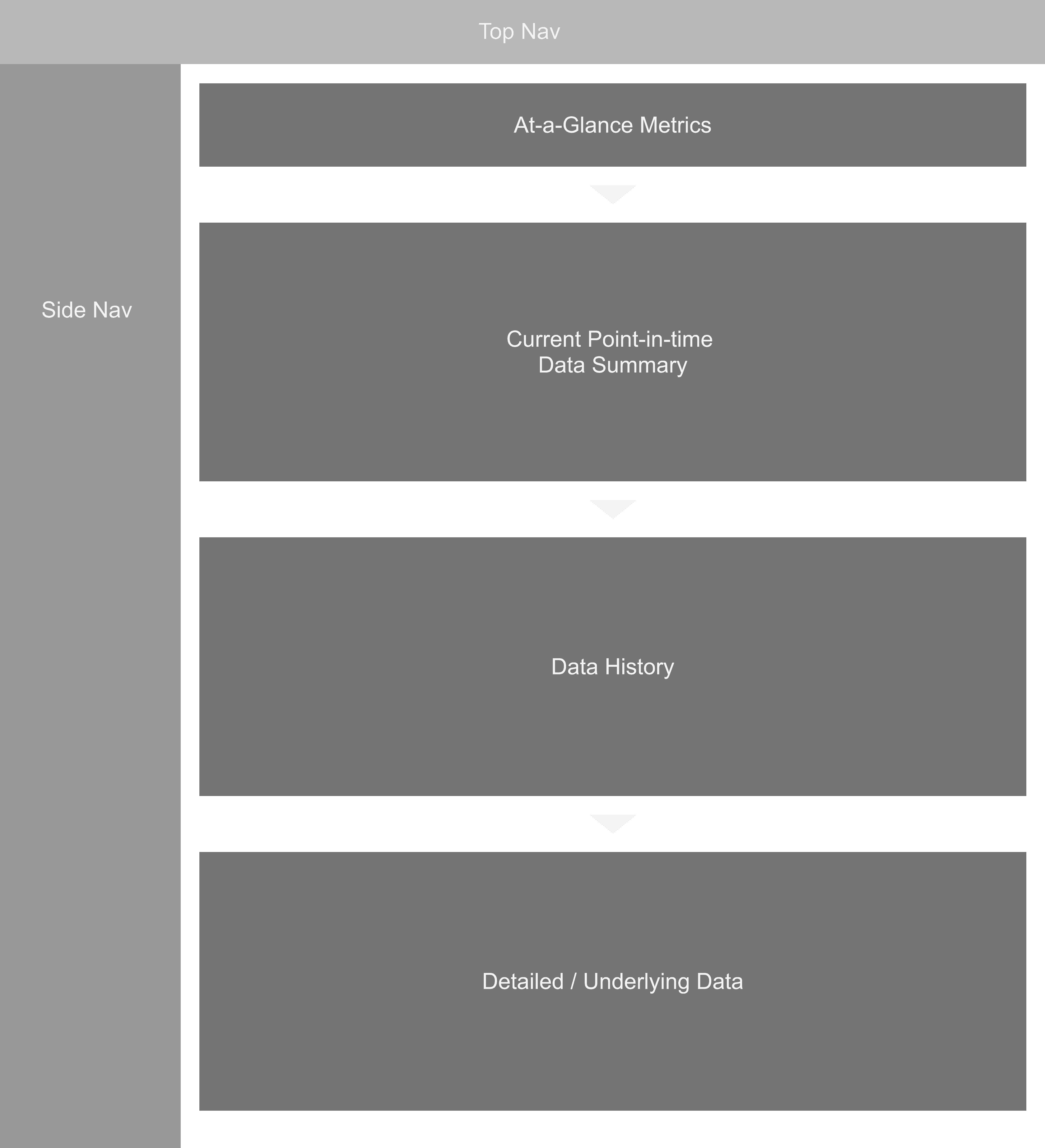
To improve the flow of each profile, I created a predictable reading order that aligned with how users actually conducted research. Every profile followed the same progression: key metrics and performance context at the top, high-level summary of the data in the middle, and detailed breakdowns at the bottom. This meant that regardless of which ESG profile a user landed on, the structure felt familiar and the path from overview to detail was consistent.
Modular KPI System
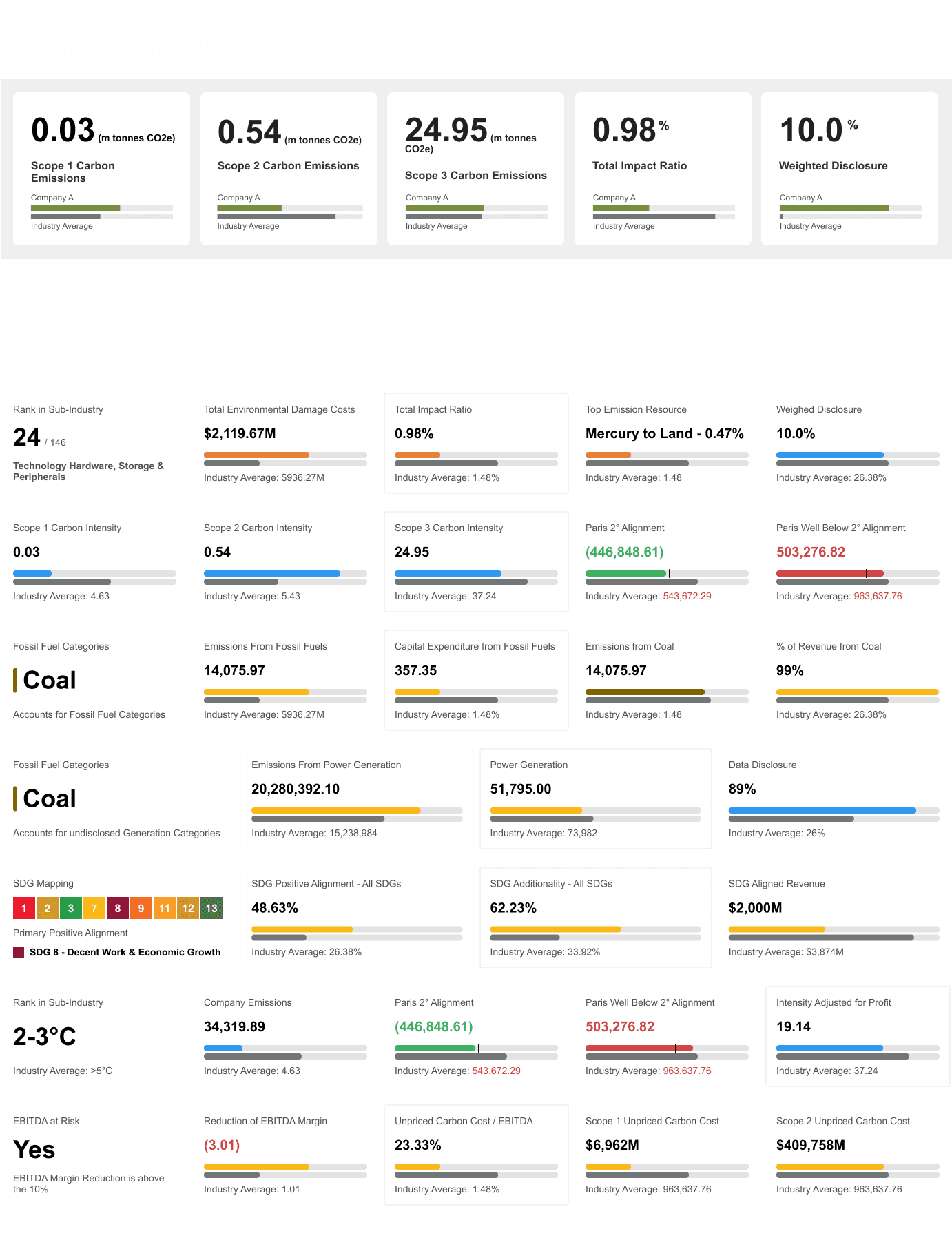
The existing metrics module had been built to display simple key metrics with an industry average comparison. It worked for basic cases but couldn't accommodate the range of data types across the ESG suite:
Monetary values
Percentages
Emission volumes
Rankings
SDG mappings
Budget comparisons like Paris Accord alignment.
When the module didn't fit, the industry comparison was simply removed due to development constraints. This stripped away the context that made the metrics meaningful in the first place.
I redesigned the KPI module as a flexible system that could handle multiple presentation modes: a gauge for industry comparison on applicable metrics, accommodation for different metric types, a view for information without logical industry comparisons (like rankings or SDG goal mappings), and a budget indicator for performance against established targets. The redesign originated in work I did for the Sustainable Development Goals profile, where I had more latitude to push the design system forward. It then became the standard component across every ESG dataset.
Historical + Benchmark Context
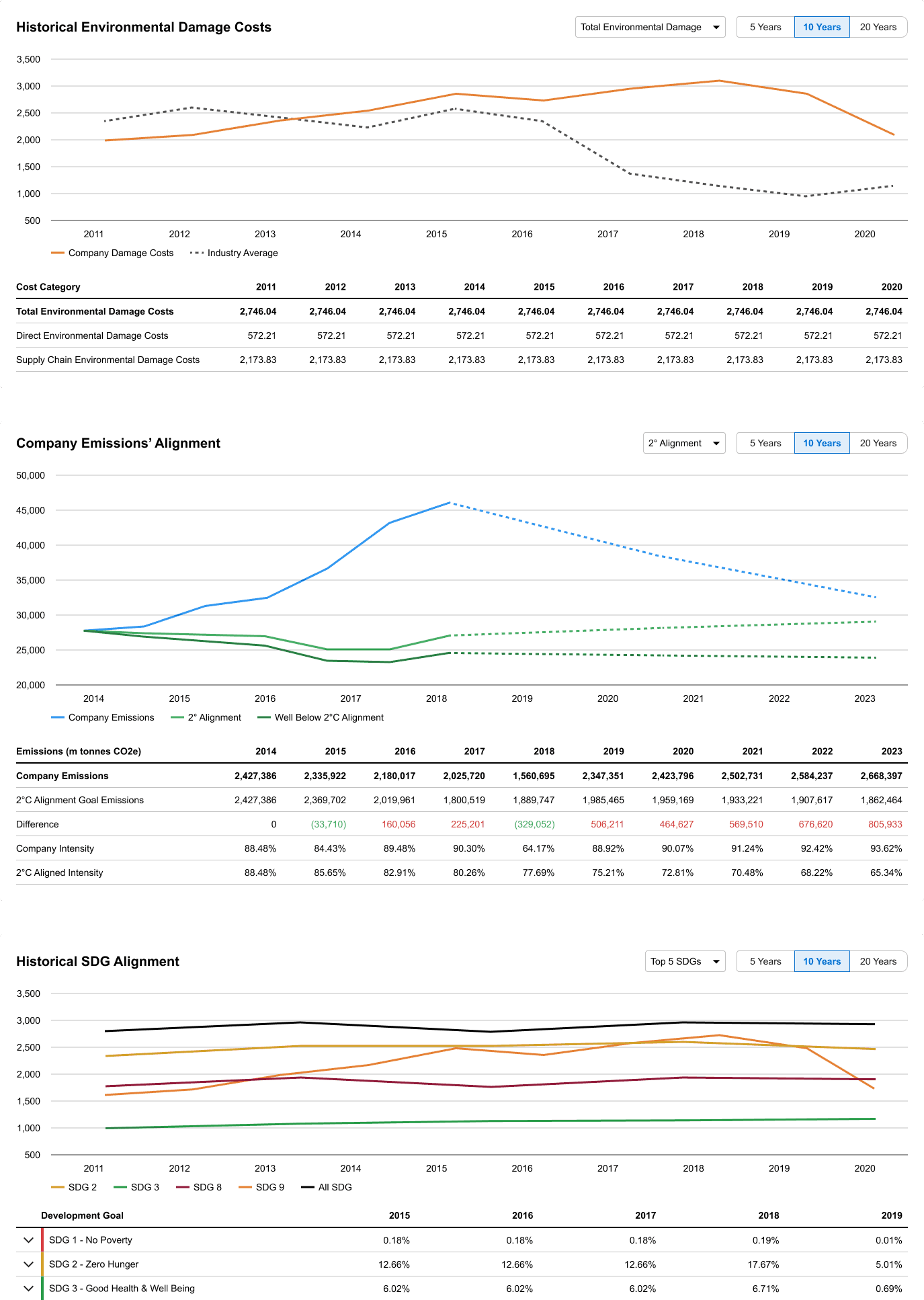
Most of these datasets were relatively new to the market, and many of the metrics were specialized enough to be meaningless in isolation. A company's total environmental damage cost of $24 million tells you very little without knowing the industry average, the company's trajectory, or whether that figure is improving or worsening.
I ensured that every profile included historical performance charts to indicate company trajectory, industry averages to contextualize against comparable companies, and where applicable, budget indicators to compare against established scientific goals like the 2°C emissions alignment. For Investment Bankers encountering these metrics for the first time, the context was what made the data actionable.
Cross-Dataset Color Coding
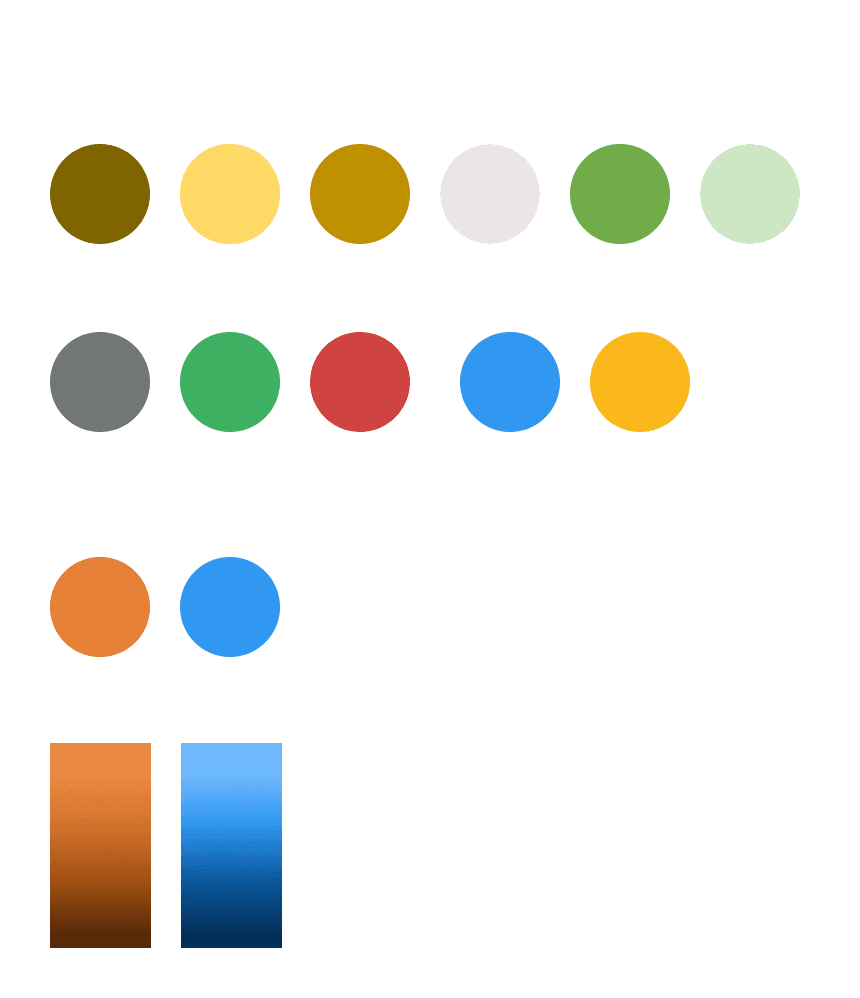
Prior to this project, all visualizations on the platform used standard charting colors with no semantic meaning. Given the number of content types in the ESG suite, I established a visual taxonomy that connected related data across profiles at a glance:
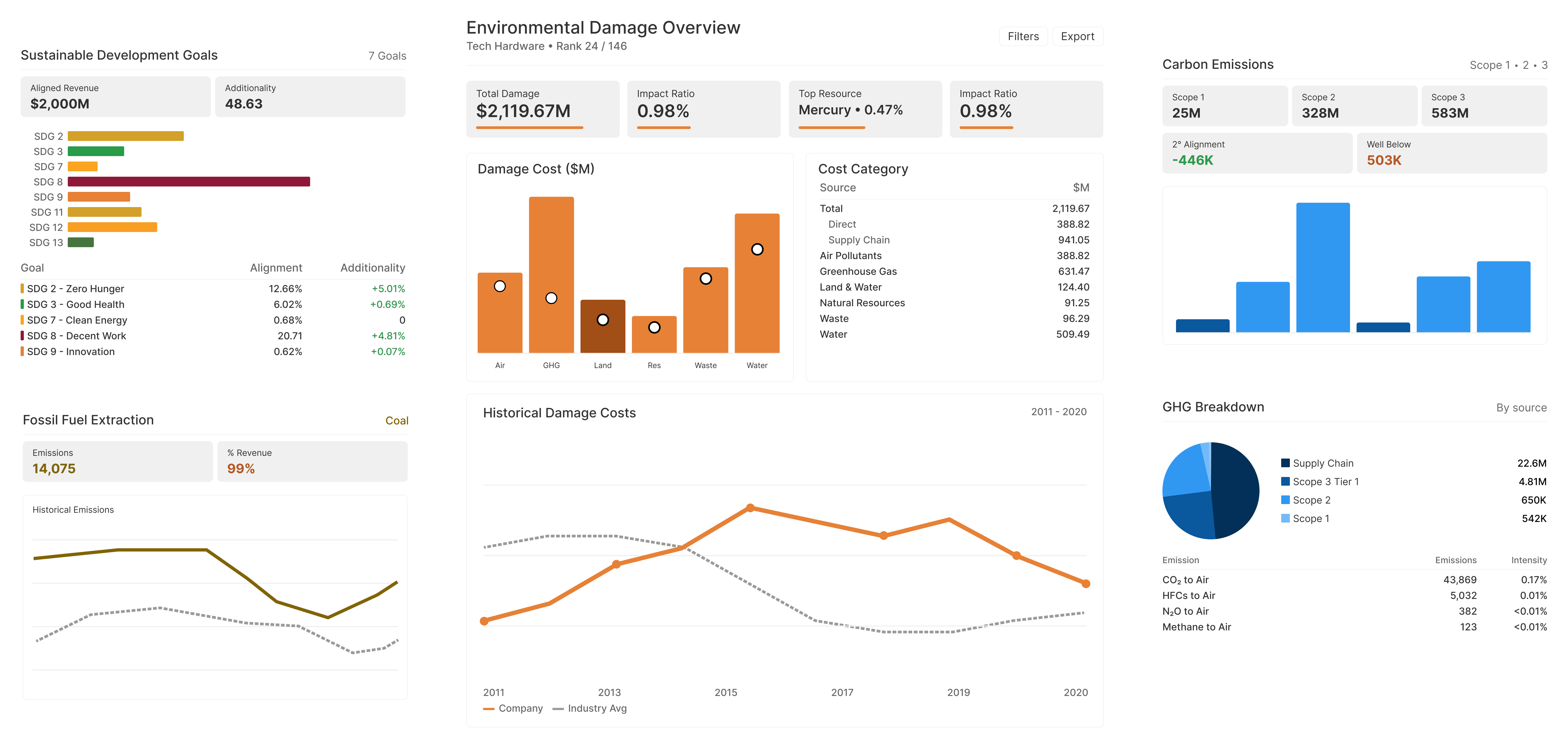
Orange for Environmental Damage
Blue for Carbon Emissions, with multiple shades to differentiate Scope 1, 2, and 3 emissions within the same view.
Brown for Fossil Fuels.
Light gray for Nuclear energy.
Standard platform colors for benchmarks, deficits, and general financial metrics to maintain consistency with the rest of the platform.
Most of these had already been established in earlier projects, the Fossil Fuel and Power Generation colors came from a country-level energy mapping project, and the benchmark colors were platform standards. The Environmental Damage orange was the only net-new color. The real work was consolidating and standardizing what had been ad hoc decisions into a deliberate system.
Notable exceptions existed: ESG Scoring carried its own centralized branding due to a public rebrand, and the Sustainable Development Goals used the UN's standard color assignments.
Environmental Damage Profile Redesign
The underlying damage resources, which roll up into overall damage costs, had been one of the key pieces of content uncovered during my data deep dive. A company could have anywhere from 50 to 150 individual damage resources spanning both direct operations and supply chain. The original design showed only the top three resources per category, a decision made to prevent overwhelming users.
Client feedback made clear this had backfired. Users couldn't identify the largest contributing resources across the company, and the arbitrary cutoff obscured the full picture.
I consolidated all damage resources into a single ranked table ordered by cost impact, with a total that conveyed the complete financial picture. I also added a toggle between direct and supply chain damage, since these two dimensions are structured and analyzed separately. This gave users both the high-level view and the ability to drill into the full granularity they had been asking for.
Applying the System to Existing Datasets
With the design patterns established, I transitioned several existing ESG datasets into the new framework. Each required adaptation, not just reskinning.
ESG Scoring
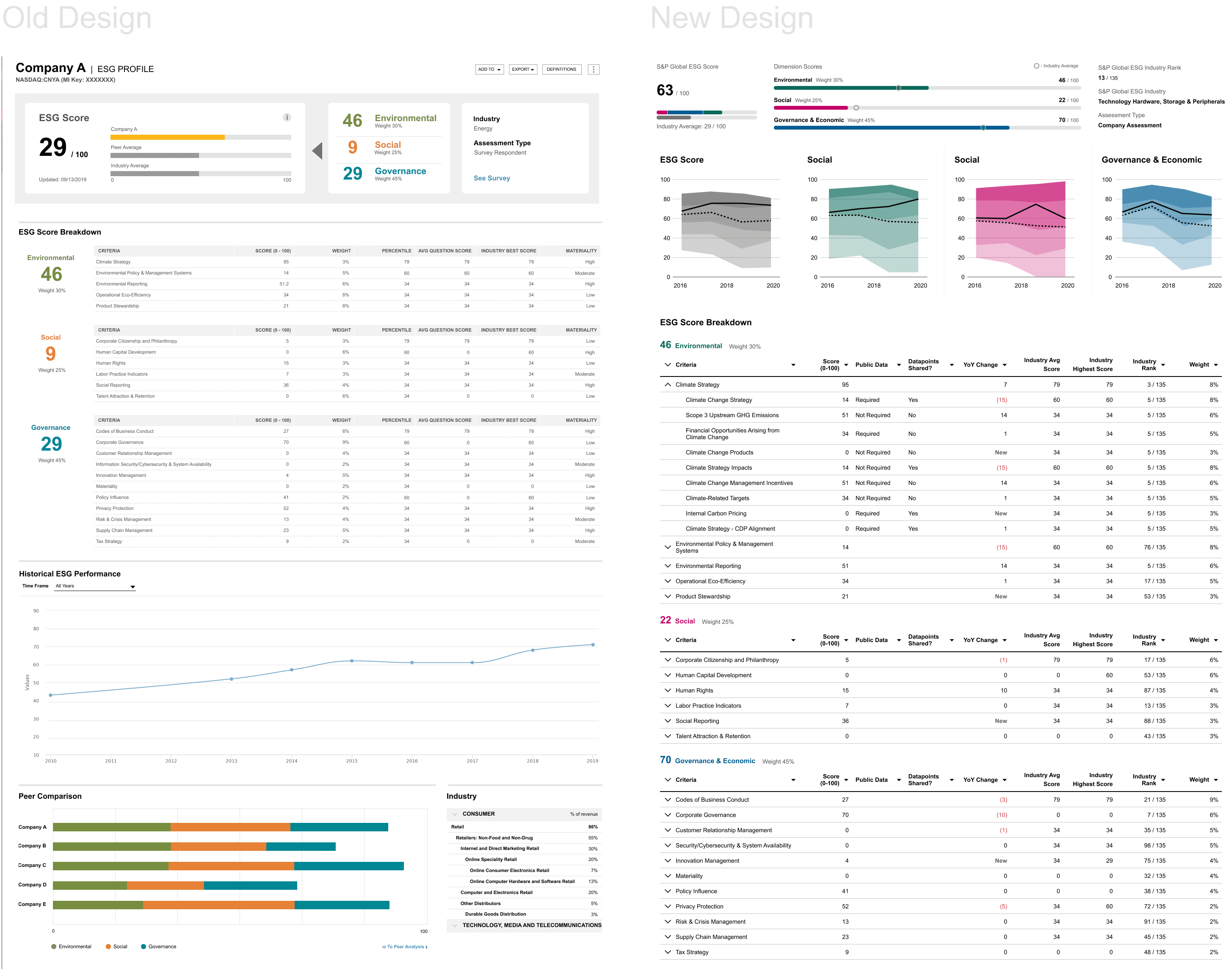
ESG Scoring went through a simultaneous data change and public rebrand, which gave us the freedom to rethink the design more substantially. The dataset was deep enough that we separated Score History and Peer Comparison into their own pages, keeping the main profile focused on the current score with the ability to explore each scoring dimension in detail. The new KPI module and page structure gave the score context it had previously lacked.
Paris Alignment
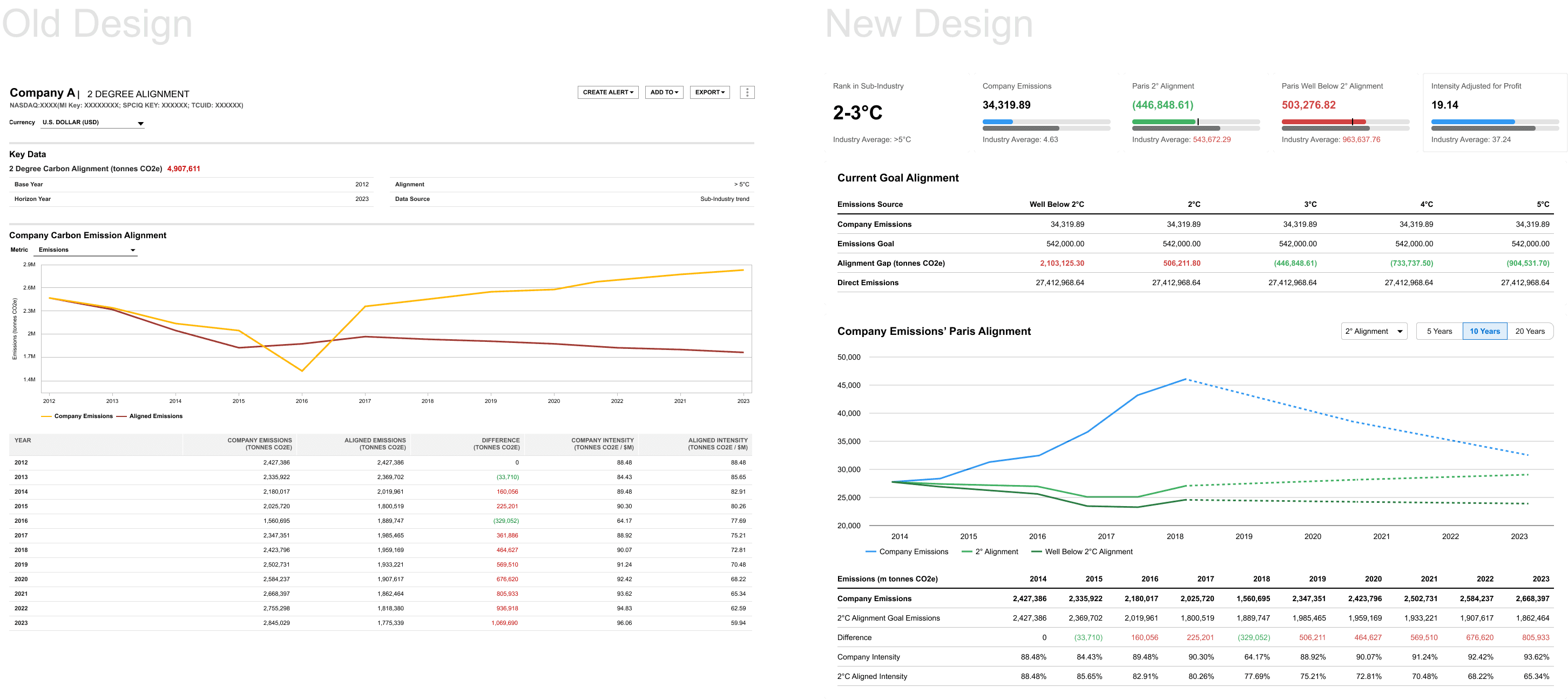
We renamed this dataset from its original title to "Paris Alignment" to encompass the broader set of climate scenarios in the accord (Well Below 2°C, 3°C, 4°C, 5°C). The redesign elevated key metrics and introduced clearer visual indicators for how a company aligned to each scenario. The budget indicator from the KPI module was particularly effective here, giving users an immediate read on alignment status.
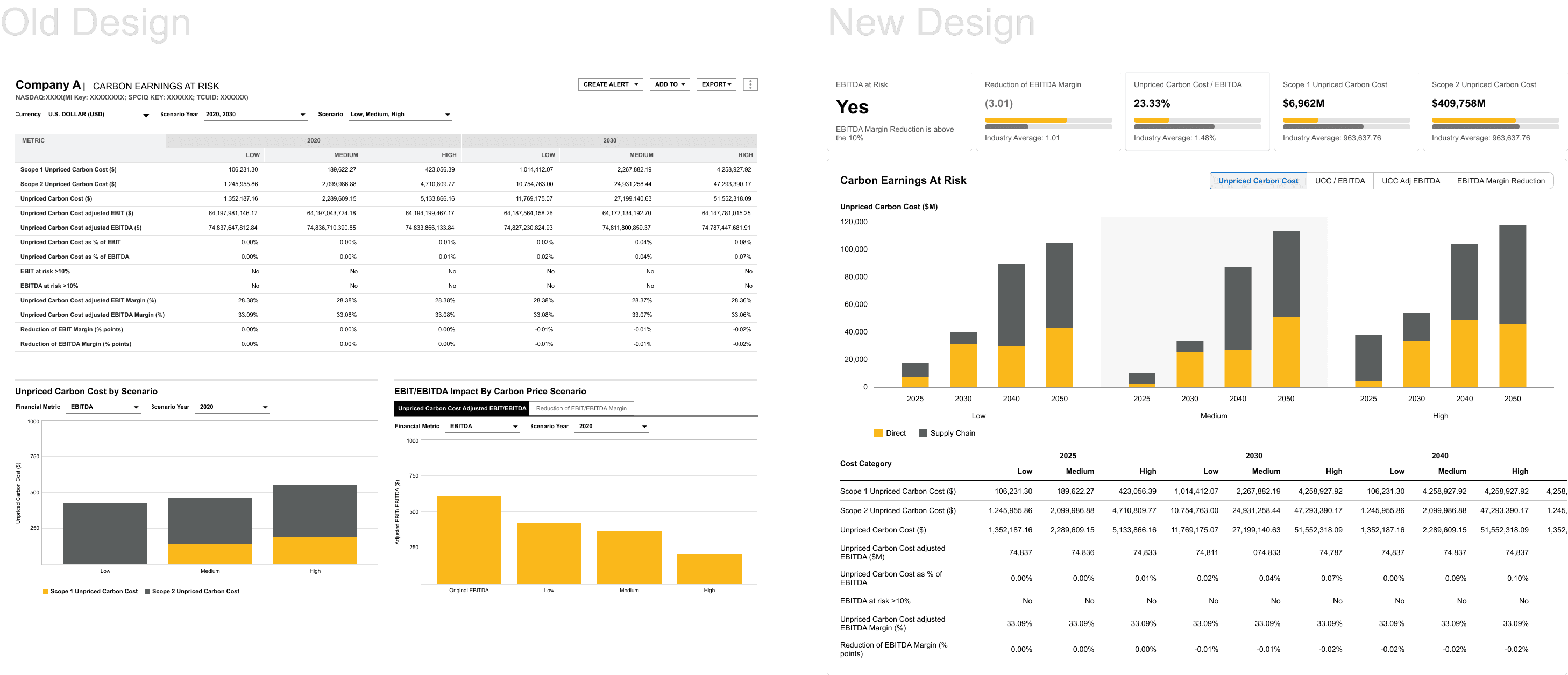
Carbon Earnings at Risk
This dataset had originally used two charts to illustrate future risk timelines, but the dual-chart approach didn't clarify the story — it complicated it. We simplified to a single view that showed all future timelines simultaneously, paired with a more flexible data table. The streamlined layout followed the same summary-to-detail flow as the rest of the suite.
Research Plan & Sign off
None of the redesigned profiles had been formally usability tested at the time of this work. I developed a research plan targeting 5–10 Investment Bankers and 5–10 ESG Specialists, focused on testing the core design hypotheses:
Does splitting the content into separate profiles enhance or complicate the research workflow?
Does the modular KPI system help users digest the pages, and are we surfacing the right metrics?
Are industry averages sufficient to contextualize company performance?
Is the breakdown of datasets aligned with how users actually conduct their analysis?
Is the cross-dataset color coding helpful for navigation, or does it register as visual noise?
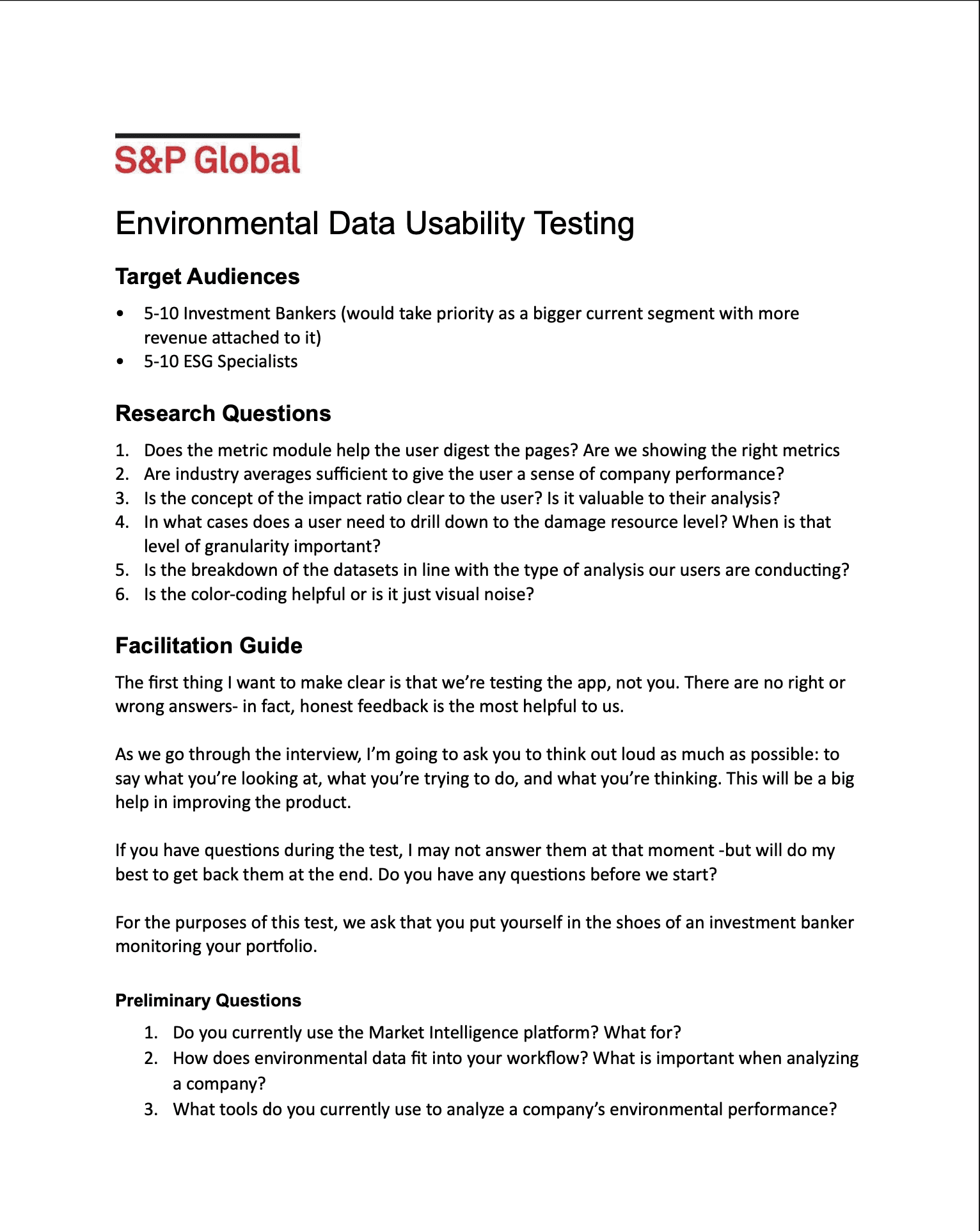
Ultimately, we weren't able to get buy in to conduct the usability testing. However, through multiple rounds of stakeholder review, we achieved buy-in to move forward with the solution. The commercial team was particularly enthusiastic about the more streamlined and standardized presentation. Implementation was proceeding in phases, with continued effort to secure client access for formal usability testing.
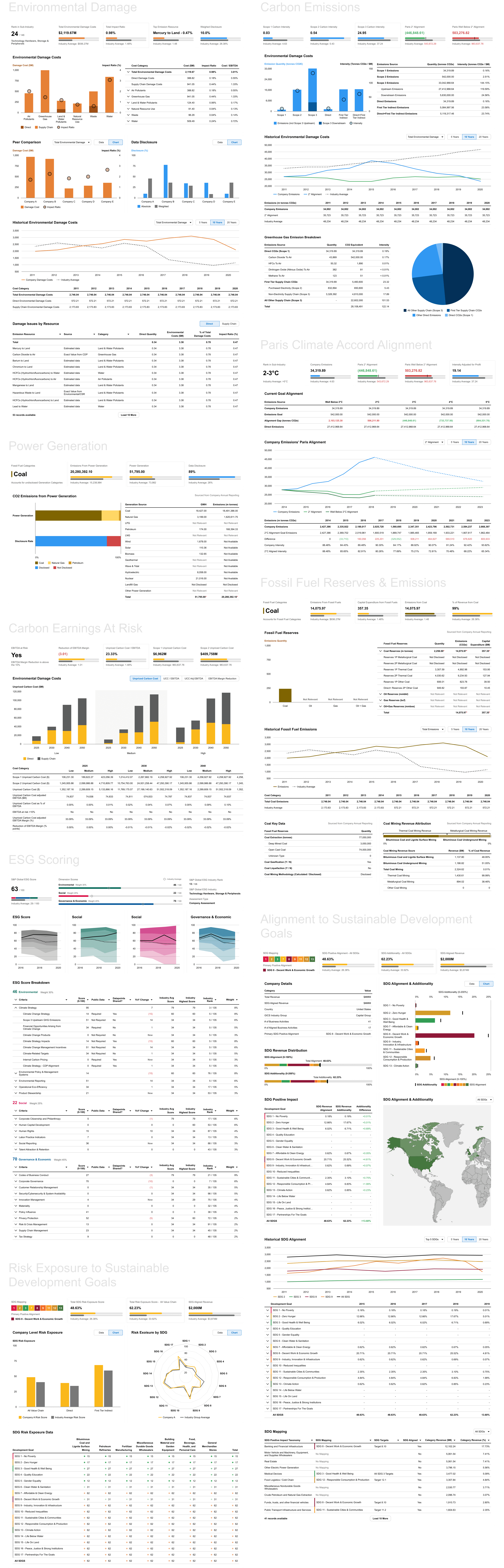
All Designs
Impact
What began as a redesign of one overloaded profile evolved into the foundational design system for S&P's entire ESG data suite.
Scalable templates reduced design and development overhead by establishing reusable page flows, component patterns, and visual standards that new datasets could adopt without starting from scratch.
Consistent experience meant that Investment Bankers and ESG Specialists could now analyze sustainability data across Environmental Damage, Carbon Emissions, Fossil Fuels, Power Generation, SDGs, and more with a familiar structure and predictable navigation.
Faster rollout of future datasets was a direct result of the standardization. Design and development cycles shortened because the foundational decisions like page structure, KPI presentation, color coding, benchmark integration, were already made.
Stronger narrative clarity emerged from separating datasets that had been competing for attention on the same page. Each profile could now tell its own story clearly, with the design system providing cohesion across the suite without forcing homogeneity.