Building a centralized data queue, and quality assurance layer for private company data.
Role
Lead Product Designer
Research
Interaction design
Design system selection,
Prototyping
Usability testing.
Team
Junior Product Manager
Engineering Manager
4 Back End Engineers
1 Front End Engineer
Data Operations leadership
Overview
CB Insights' News Queue was the pipeline that turned news articles into structured data. It recorded data like funding rounds, company data, M&A and investor activity. The queue's backlog had grown out of control, and resulted in weekly fire drills for the data operations team. Leadership wanted to bring in external vendors to bring the backlog under control and apply internal resources to other data sets.
The queue had no built-in quality controls. There was no scalable way to onboard a vendor, track their accuracy, or catch bad data before it reached customers. I designed a quality assurance system that let us safely scale vendor work, and ultimately reshape how the data team operated.
My PM was stepping into the role for the first time, so I had to take a higher degree of control of the product strategy and provide mentoring. I had very free reign on how to approach the project. For me that meant ensuring design was based on user insight, and design happened early enough that we could prototype and usability test our solution before development started.
Context
Before this project, data associates did their work in two places:
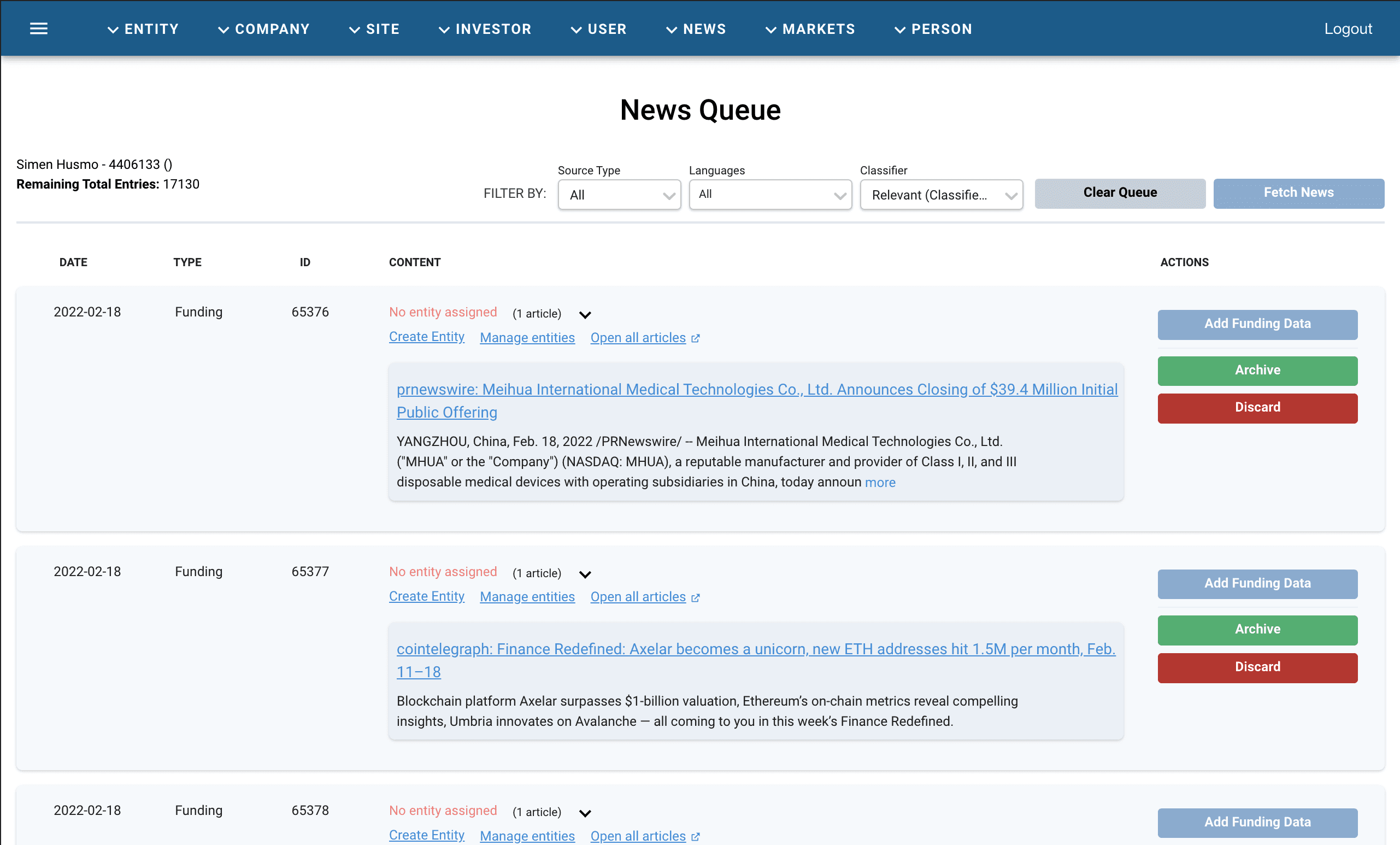
The News Queue
Where Reviewers read incoming articles, assign them to entities, and decide whether to add a funding round, archive the article, or discard it.
The Entity Admin
The underlying system of record where all company data was edited.
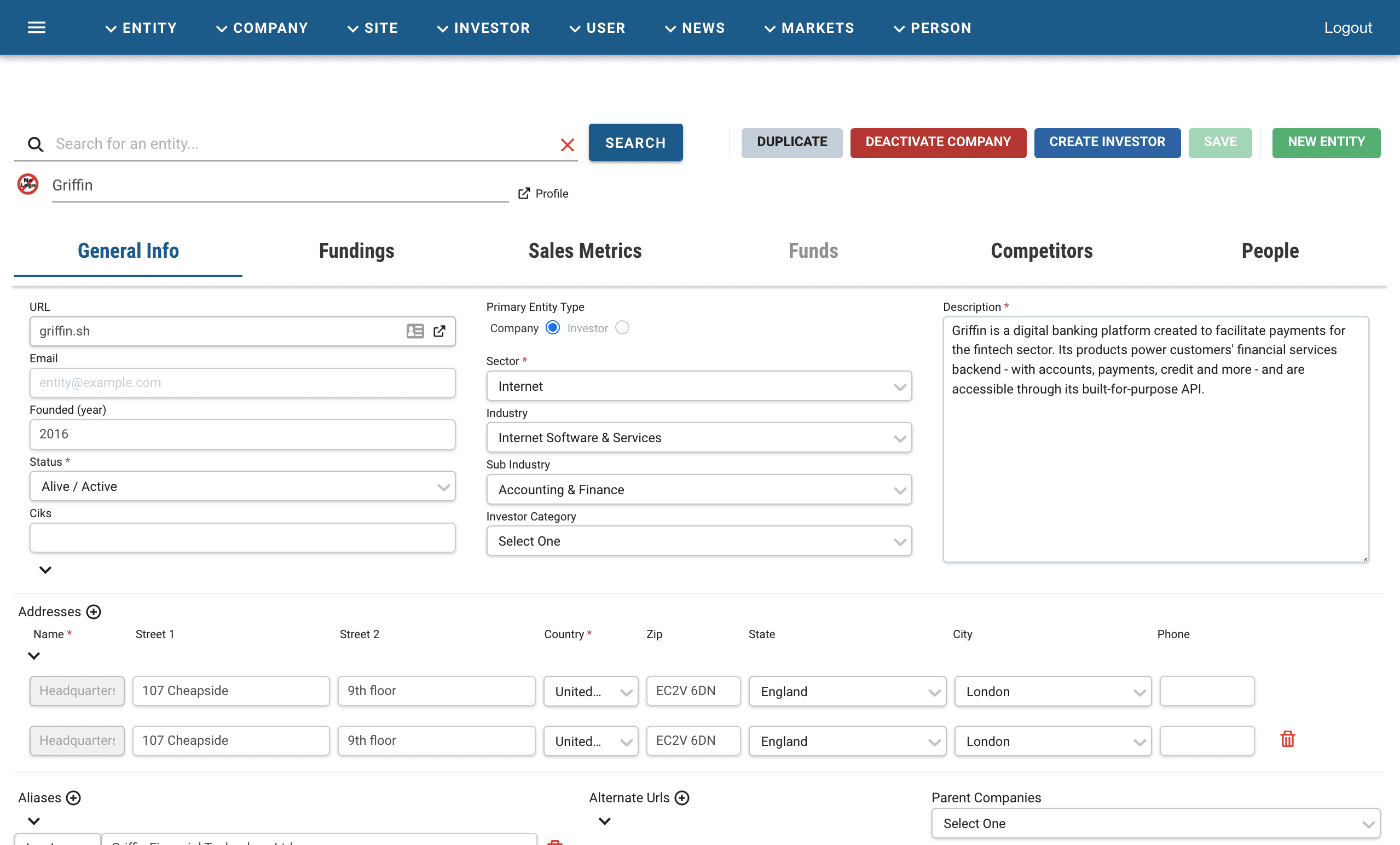
Every action moved through both: read an article in the queue, then create or update the corresponding company in the Entity Admin. Whatever an associate saved was published immediately and visible to customers.
The Problem
The News Queue backlog had ballooned to over 17,000 entries and was still growing. This resulted in weekly all-hands-on-deck operations and many late nights for the data team. It also diverted attention away from other key data queues, like Valuations, People, Business Relationships etc.
The data operations team couldn't catch up, so leadership wanted to contract external vendors to process entries at a higher scale and lower cost. This came with a larger problem that had never been solved:
The queues had no quality checks. Anything saved in the admin went live to customers instantly.
Bringing in third-party reviewers without a safety net meant that mistakes would land directly in front of paying customers. We needed a way to let vendors do their work without giving them a one-click path to publish, build a quality checking layer and start shaping their workflow.
The Funding Data Workflow
The Funding data and company data was completely interrelated processes. If you updated one you needed to update the other. Below I have laid out a diagram of how an article from the News Queue is processed and transformed into data. It goes through a series of decision points (marked in blue) and rigorous research. This diagram also include the quality assurance layer, which was added as part of this project.

A Test Workflow
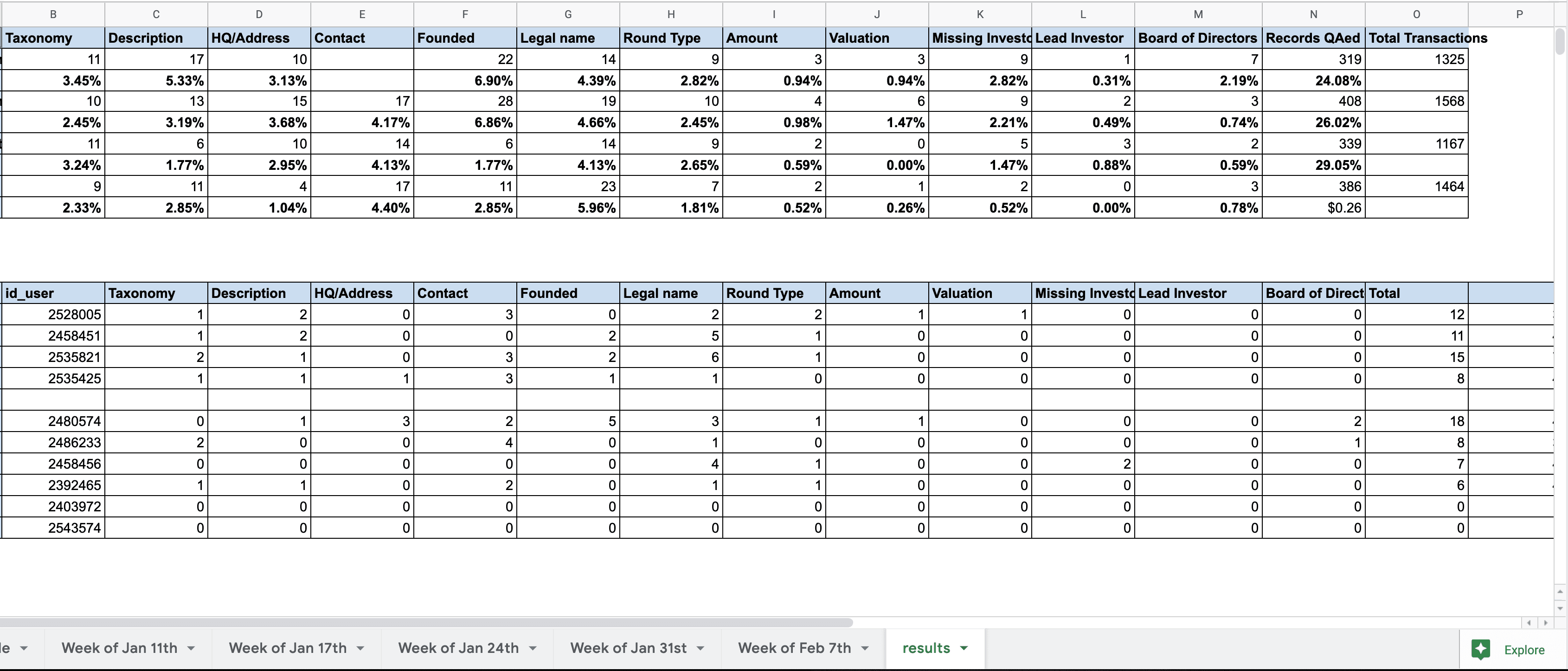
To get an early sense of the workflow, my PM and I worked with the data ops team to set up a test QA workflow with the internal team. A spreadsheet was created to simulate the data assignment and entry, and allowed Data Managers to review work and track errors. The intention was to identify problems with the process early and work them into the design. The process looked like this:
A daily query pulled a sample of the team's published output.
QA associates copied that sample into a spreadsheet and manually checked it against the source articles.
Errors were tallied and rolled up into monthly performance views.
The process was functional and actually increased the throughput of data team as a whole. However it did point to three structural problems:
It happened after publishing the content. Errors were already public by the time anyone caught them.
It lived outside the data platform. During QA associates had to bounce between the admin, the source articles, and a spreadsheet to do a single check.
It was almost entirely manual. A data manager had to run a query on work done, copy+paste the data into the sheet, manually assign rows and ensure the spreadsheet logic was functioning.
The solution: Drafts
The core idea was very simple: let users save changes without publishing them.
A draft state would let a vendor complete their research and save everything without putting their work in front of clients. A QA Associate would review the draft, compare it sources, and either publish, edit, or send it back.
Drafts solved the immediate vendor onboarding problem, but alone it would not serve as a workflow. We also need to start shaping a centralized workspace for the work to be assigned and monitored. Leadership envisioned that the space to eventually encompass all our queues, and centralize all data work into one single work stream.
The backend implementation would present a big investment for the company, so we needed to ensure that we were building the right thing ahead of time.
Long-term Vision
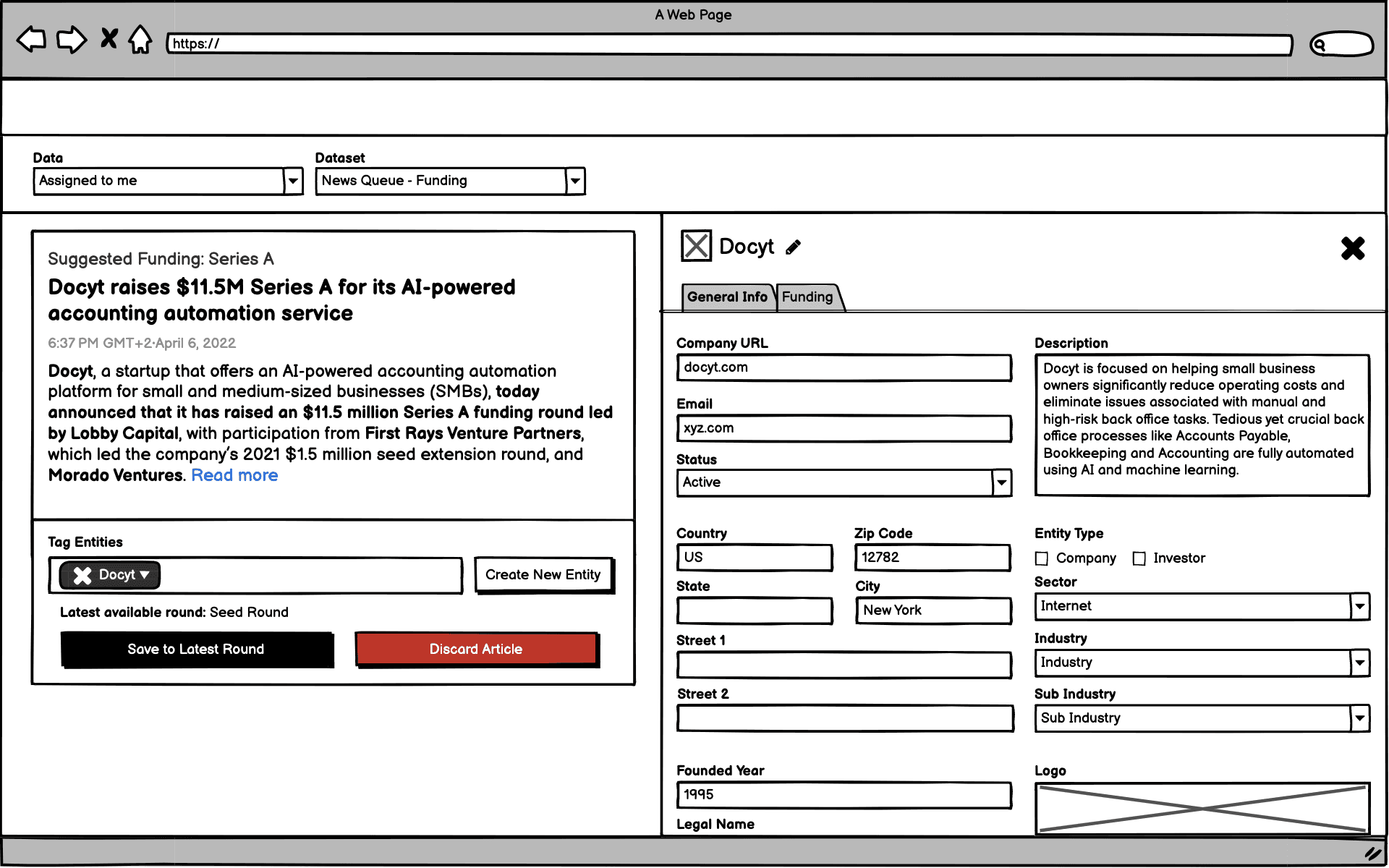
I worked with our VP of Data to map out and explore a few North Star concepts:
Sample Review
Once vendors were trained and scaled up it would no longer be necessary for the internal team to review every single entry. How could we build ways to facilitate this in the platform? Basically creating a confidence score for each associate working. Then gather up their work into a batch and serve a sample of that work up to a reviewer based on their confidence score.
Unified Admin
This was the true North Star.
1. Bring all company level datasets into the entity admin (many were not connected).
2. Join the News Queue and Entity Admin into a single workspace.
3. Then, join every data queue into that single workspace.
Performance Space
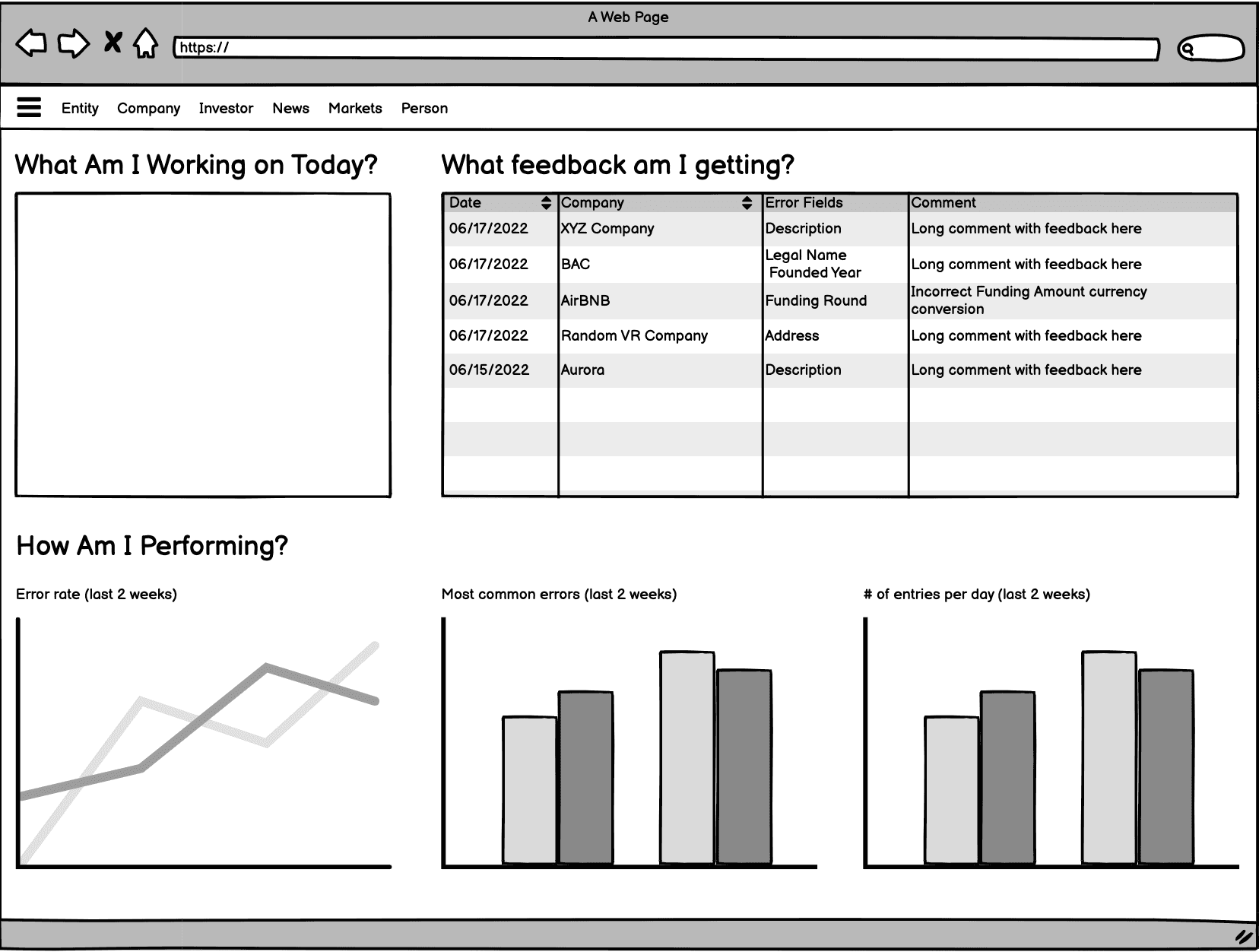
When an associate came to the platform we wanted to welcome them with a dashboard that said:
How are they performing?
What is the feedback they are getting?
What work has been assigned to me?
This would center them on the errors that they had made previously and give them context from senior members of the data team for how they could improve. That would bring them into their work with an awareness of what needed improvement.
Automating Data Extraction
It seemed to me that there was huge possibility to automate the first layer of data extraction both from the news queue as well as from company websites in order to automate the first level of review. The articles were already being ingested into our system and scanned for relevance. So why not for data points? In fact, in my design challenge to join CB Insights I designed with the assumption that that level of extraction was already possible.
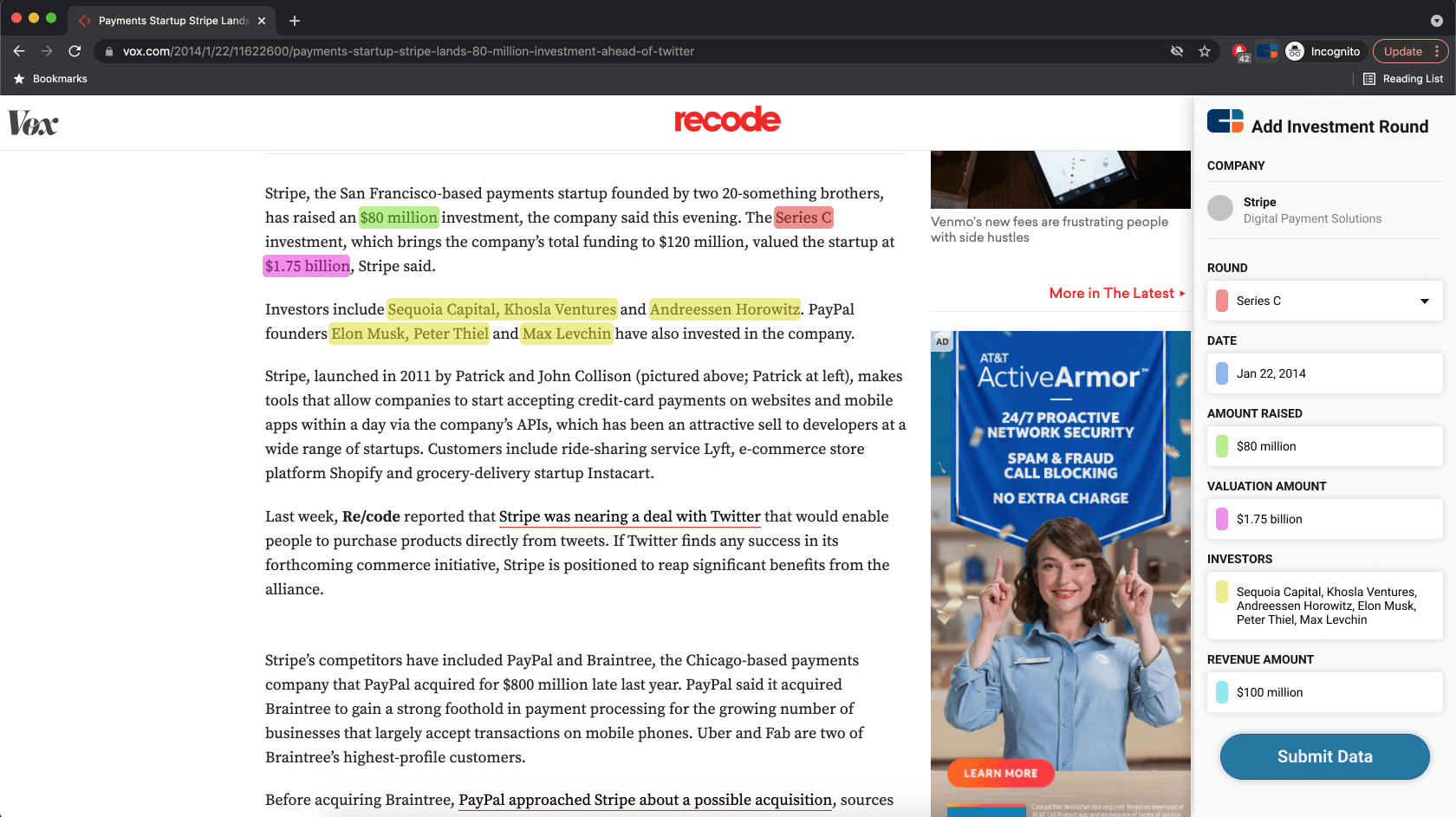
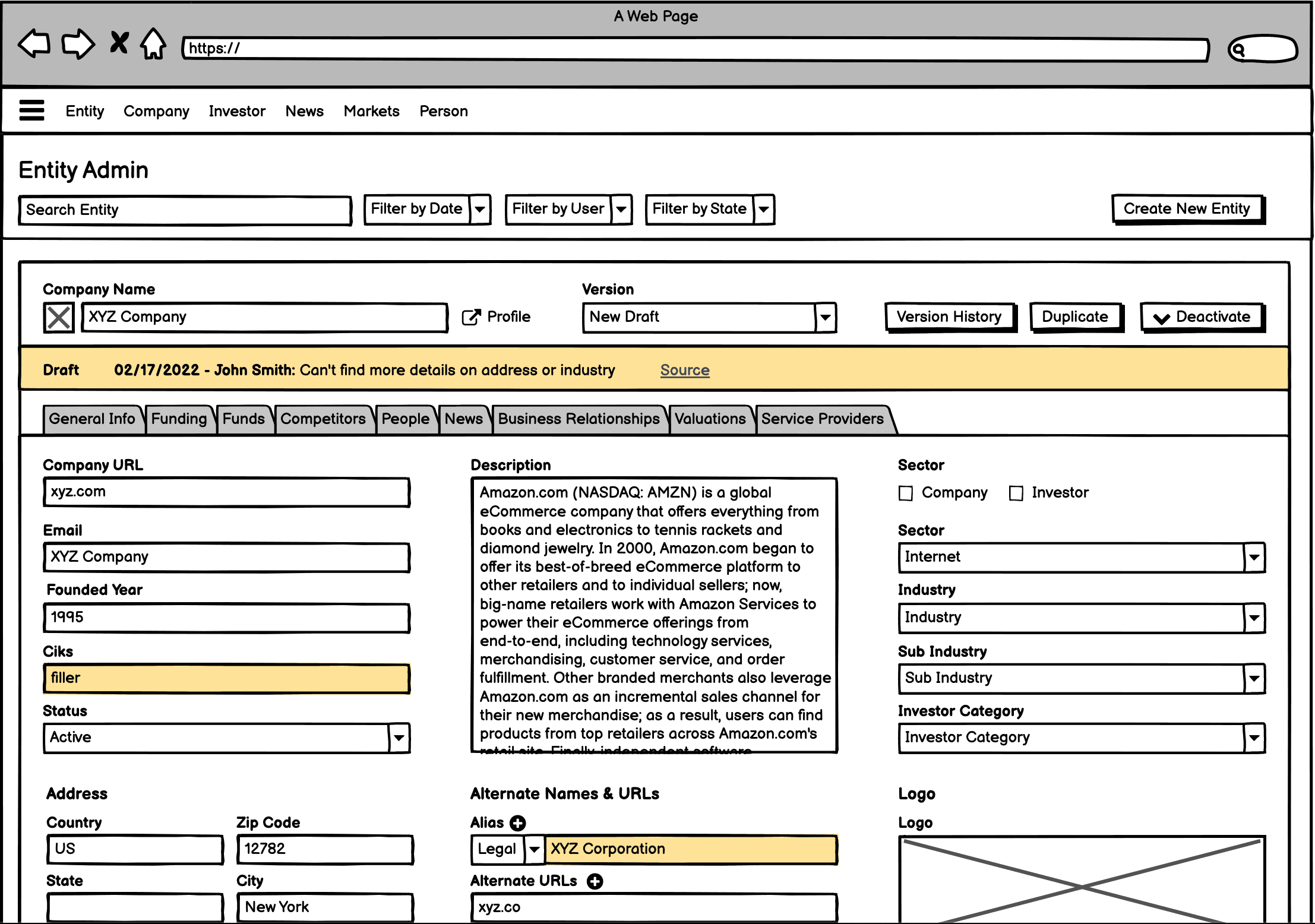
A screen from my design challenge with CB Insights exploration automation of data extraction.
I never got any traction on this argument with data or product leadership, likely because the costs were too abstract. However, when I later worked with our data science teams I found out it wouldn't have been costly at all relative to the cost savings. At the time data science was working separately from data operations team, and always in high demand, so I didn't have much access to them at the time.
User Research
I wanted to understand how the spreadsheet QA workflow actually worked on a day-to-day basis before designing anything.
Goals
Understand the QA workflow
What was working right now?
What wasn't?
Participants
1 Data Support Manager
2 Data Managers
2 Senior Associates
What we heard
There was no indication of what fields had been updated, and the QA associate wouldn't know what specifically to review. This often meant that they reviewed every detail, updated or not.
The QA spreadsheet added yet another tab to the 5-10 tabs that were already needed to do research and entry. It added a lot of mental overhead.
There is no direct feedback mechanism from QA back to the initial reviewer. The errors got logged, but wasn't communicated to the person who made the mistake.
Performance data from the process wasn't saved and analyzed across multiple months, so it was hard to spot trends and gain real insight over time.
What They Liked
The sheet gives a great overview of work that needs to be done. In the admin this had been a black box and felt like an never ending is to handle.
Has a clear overview of how individuals are performing every month.
Can schedule work somewhat predictably based on the size of work assigned. This was somewhat random in the queue.
What They Disliked
The process was extremely manual: Copy spreadsheet to spreadsheet, manually assigning work, very little automation in the spreadsheet.
There were just too many tabs involved.
Improvements
Coming out the research process, I connected our insights to our draft solution. There were some things that naturally blended into the work we had planned:
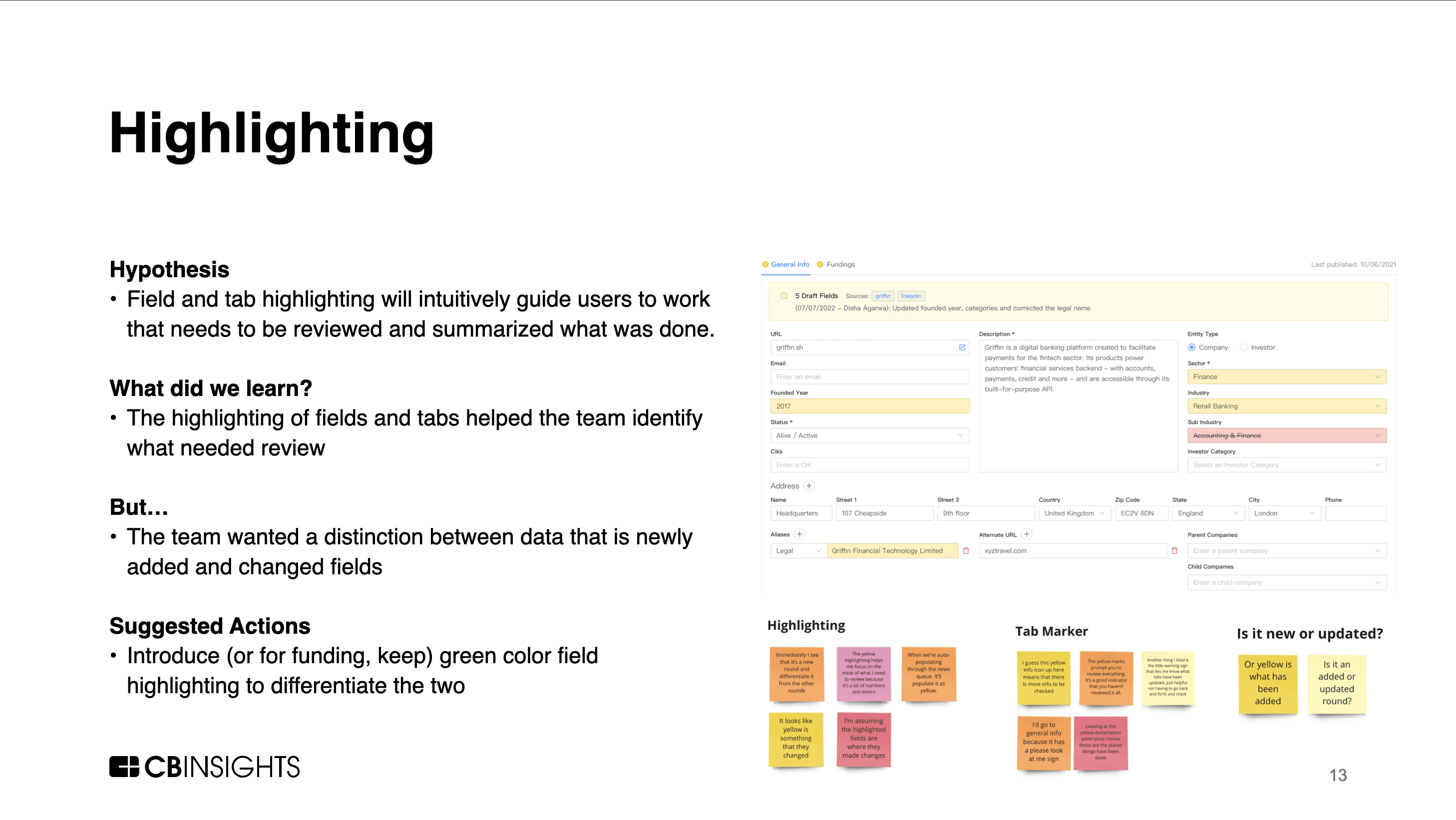
Highlighting fields that needed review would be an easy add and be a huge time saver for our internal team.
The centralized queue had potential to reduce the amount of tabs needed. Instead of having the queue, the entity admin and spreadsheet open, it could open the entity admin cycle through the data that needed review. That would reduce 3 current admin tabs into 1.
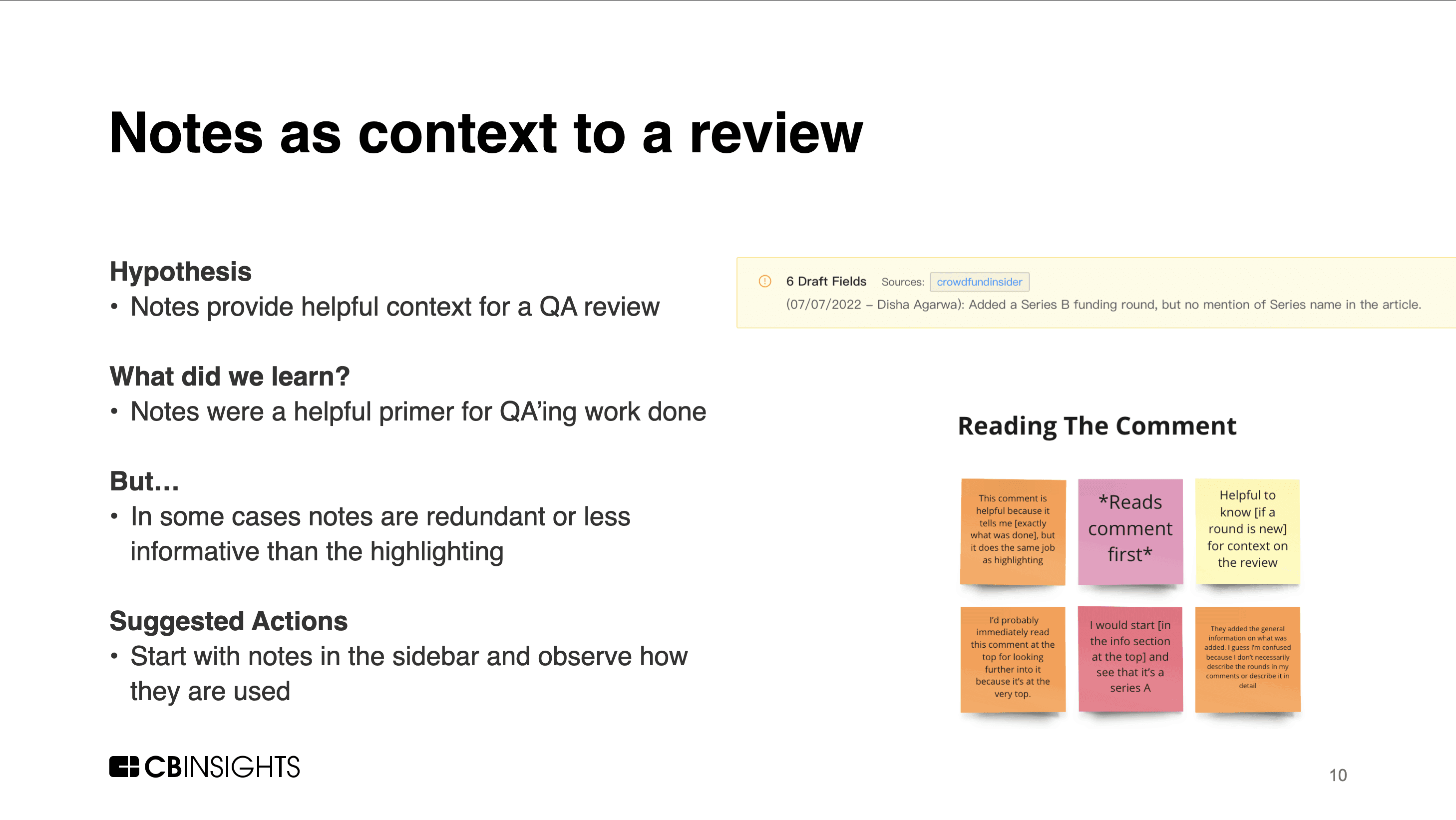
By adding a note with each submission we could enable back and forth communication. The reviewer could pass on relevant notes from their research, while QA associates could give qualitative feedback on the work. Kind of like merge requests.
The queue would enable the QA Associate to assign work back to the initial reviewer if necessary.
Building drafts into the platform would enable us to track errors, and by extension, performance.
Performance dashboards would not be an immediate priority since that data would now be available in our data warehouse. So the data team could build queries to export performance metrics in the short term.
Design
Wireframes
Working with engineering we split the work into three rough stages of value addition:
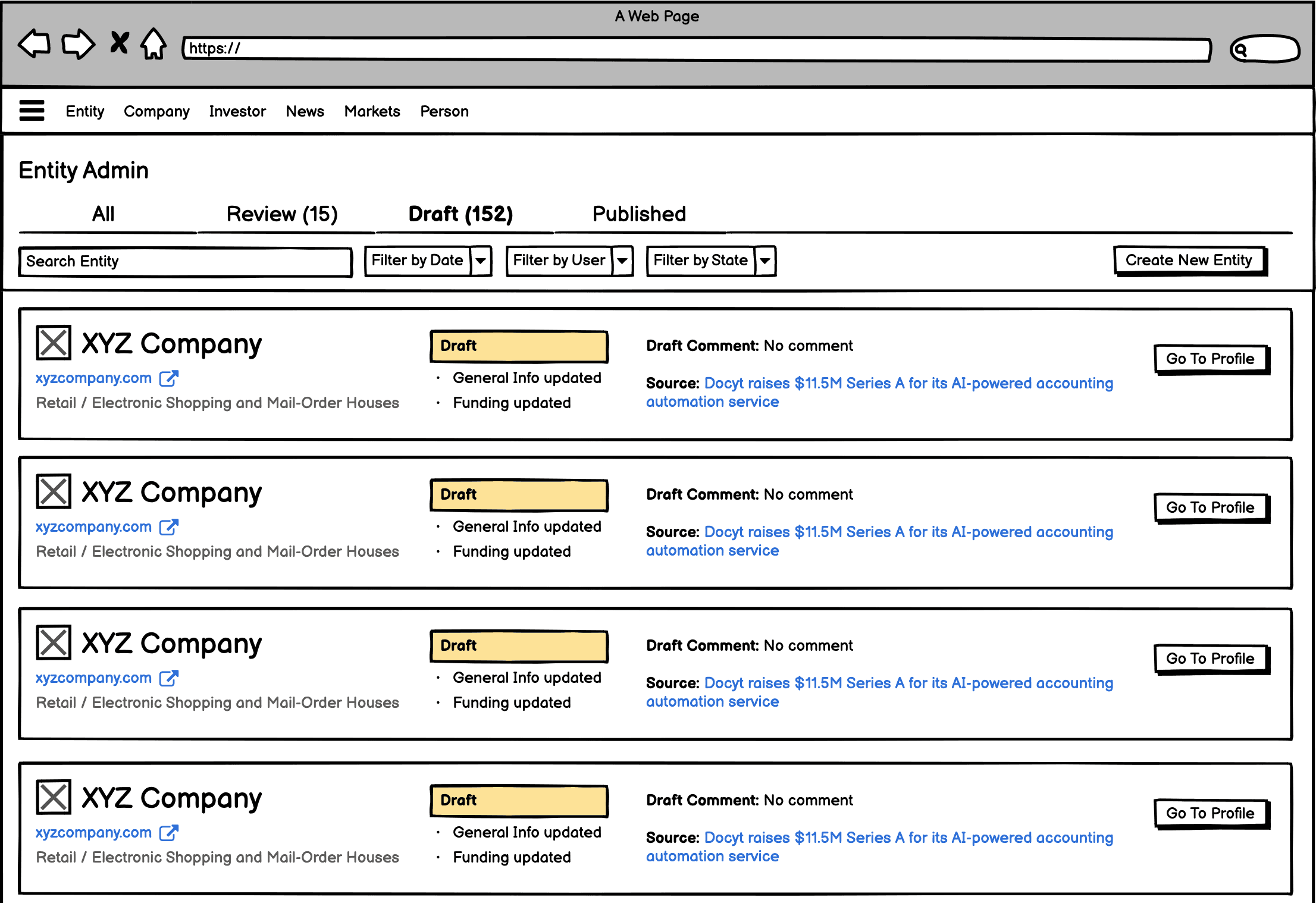
Create the queue and add the drafts in the funding section
Add General Info drafts for a company
Move News Queue into the centralized queue
"Future items" (Unified admin, Sample Review, Performance Dashboards)
We started by envisioning what the two first stages might look like. It focused on the following features:
Highlighting changes
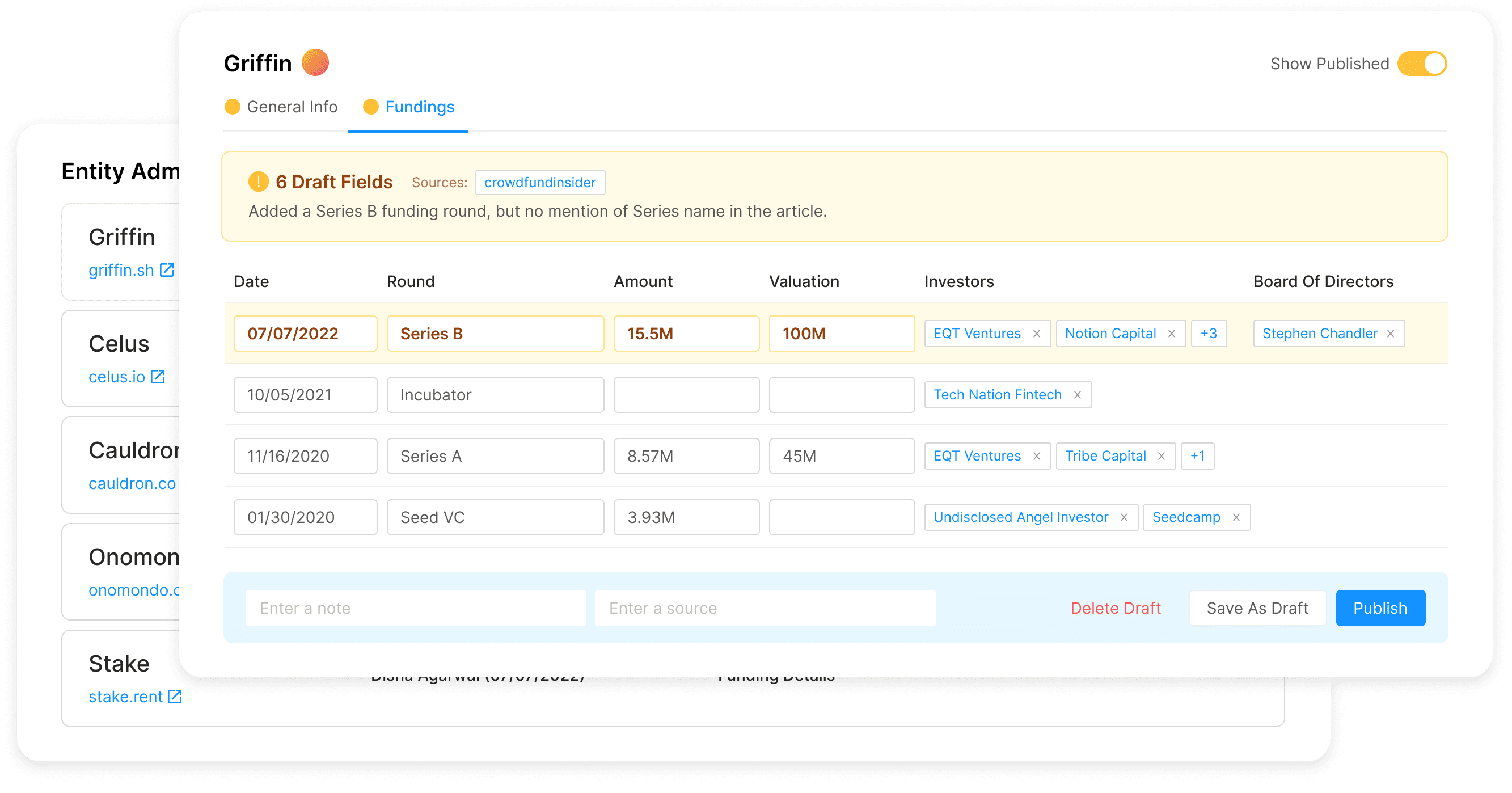
Enabling a reviewer to immediately see what a vendor edited rather than having to check every single field. Based on our research this would have the highest impact for our team.A central queue to monitor
A dedicated draft queue to monitor what work needed to start, what needed review and what had been published.Communication between stages
Notes that travel with the draft from reviewer to QA giving relevant context, and feedback on the work flowing back to the reviewer.Show published values
While it hadn't come up in initial research, I noticed that with the drafts in place the QA would not be able to see what an updated value had been updated from. Which would create more review overhead, so I explored solutions to handle this.
Design System
Most of the data admin had been built without design in the loop. There was a component library that was being maintained, but it was very sparse.
Our Front End enablement group didn't want to continue maintaining this library. It was cumbersome to have two component libraries to monitor and maintain. In addition, branding was not an important consideration for the data admin. So could we replace the component library with a pre-built design system?
I partnered with the group to evaluate design systems for the platform. We set a few goals in terms of cost, robustness, implementation effort, fit with our React stack. I reviewed just about every publicly available design system I could find (Material, Lightning, Carbon etc). Ultimately, we landed on Ant Design.
Ant was the only system we found that could get close to our specialized needs. We needed a system that could handle uncommon data table and form configurations and flexible design implementation. We only had one front end engineer and it took a lot of pressure off him in the short term. In the longer term it reduced the time & effort needed to implement new admin pages.
High Fidelity Prototype
With the wireframes and the design system in place we were ready to go into high fidelity design. Development was nearing and I wanted to test our assumptions as soon as possible.
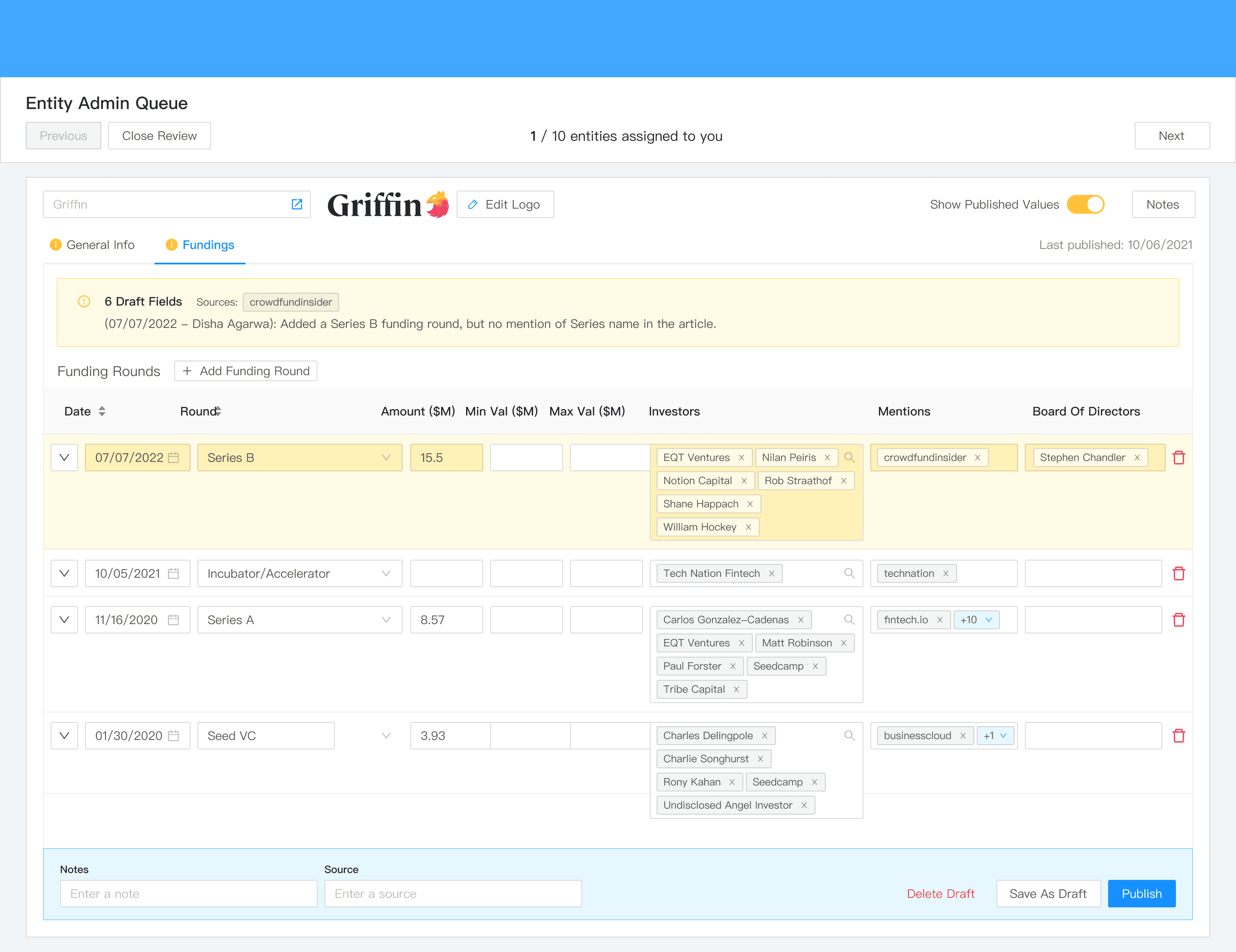
With Sketch+InVision (this was 2022), I built an interactive prototype covering the full vendor-to-QA flow:
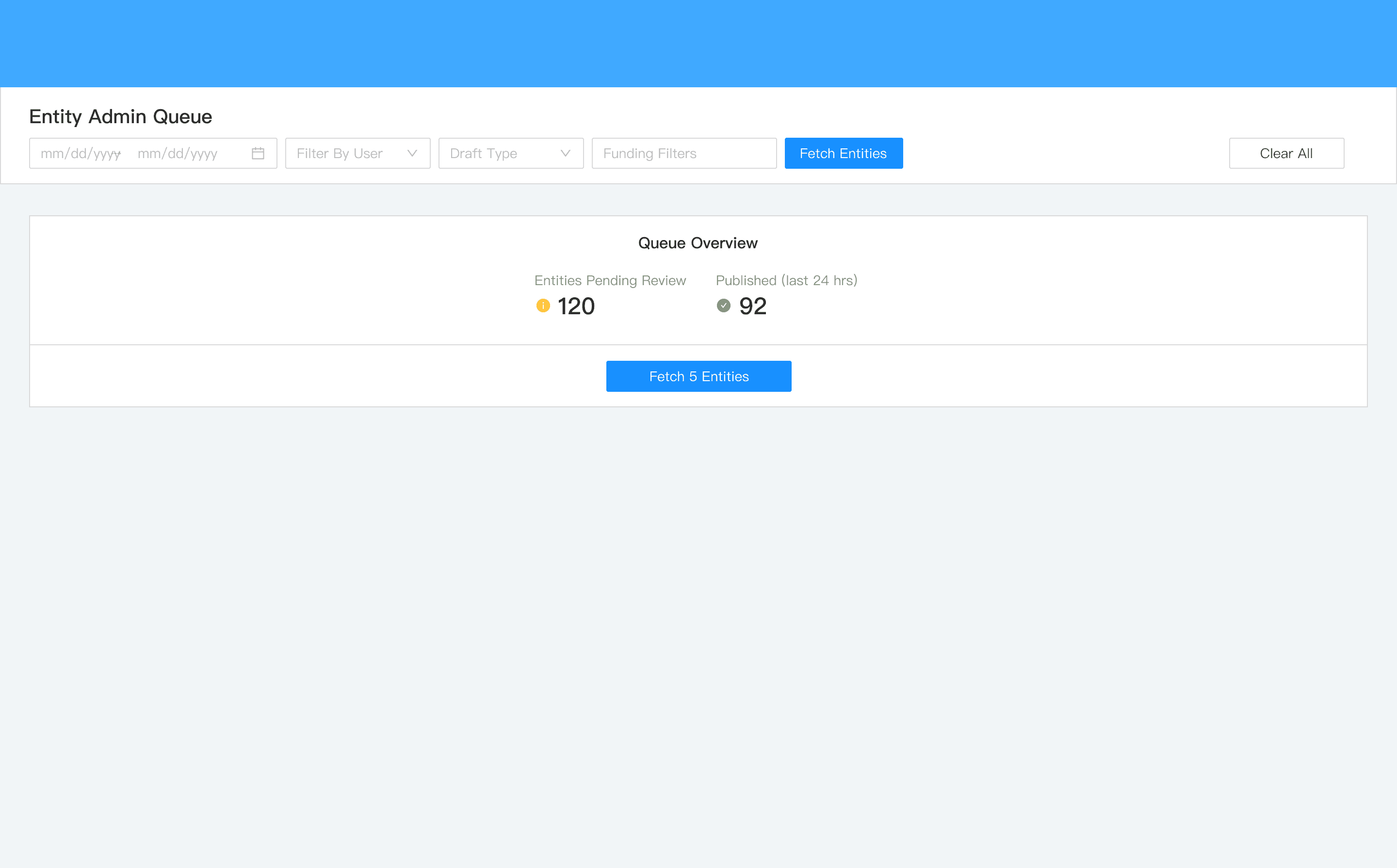
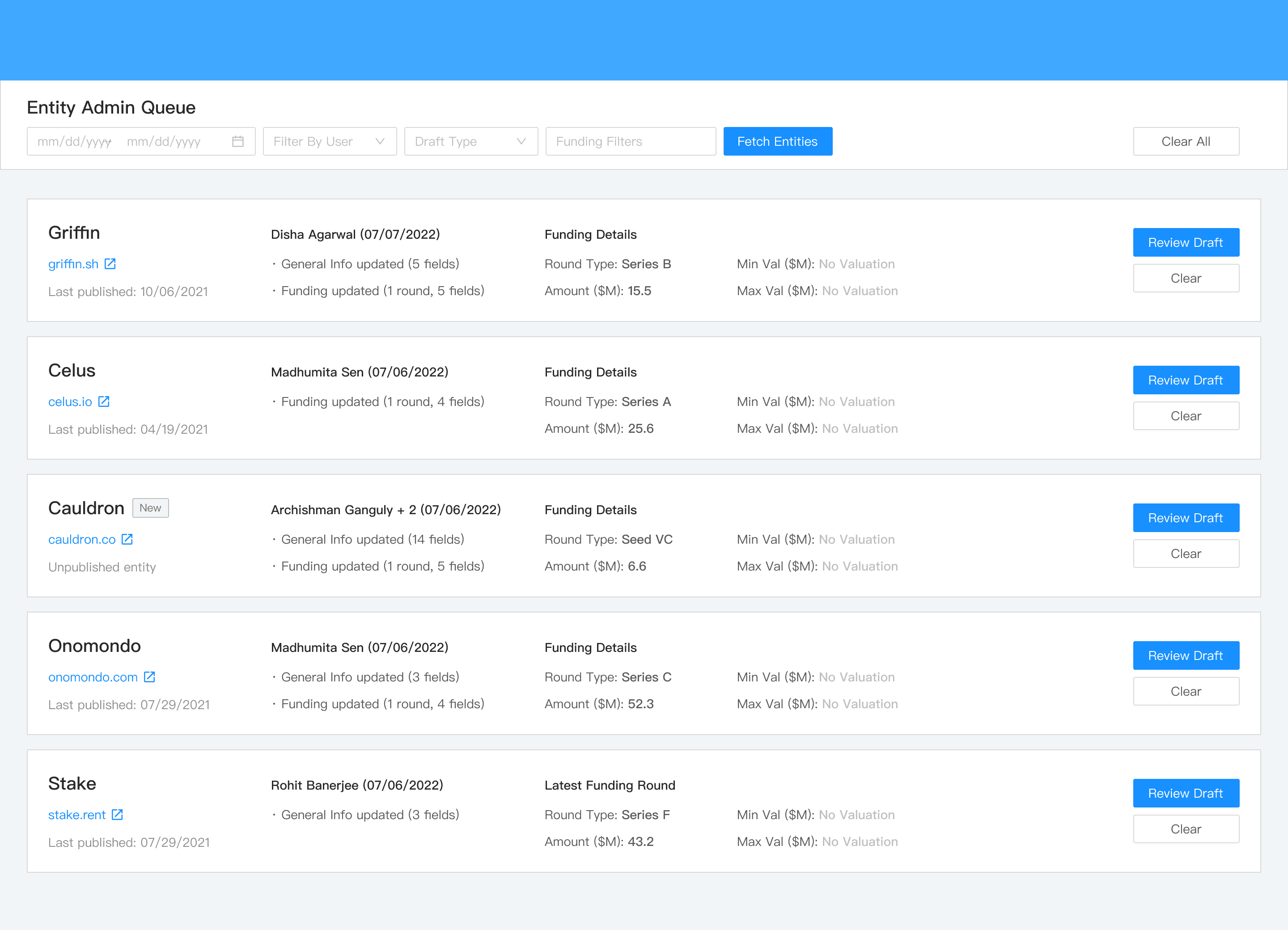
Work queue with filter controls and clear counts of how much work was pending.
List view of work that needed to be done.
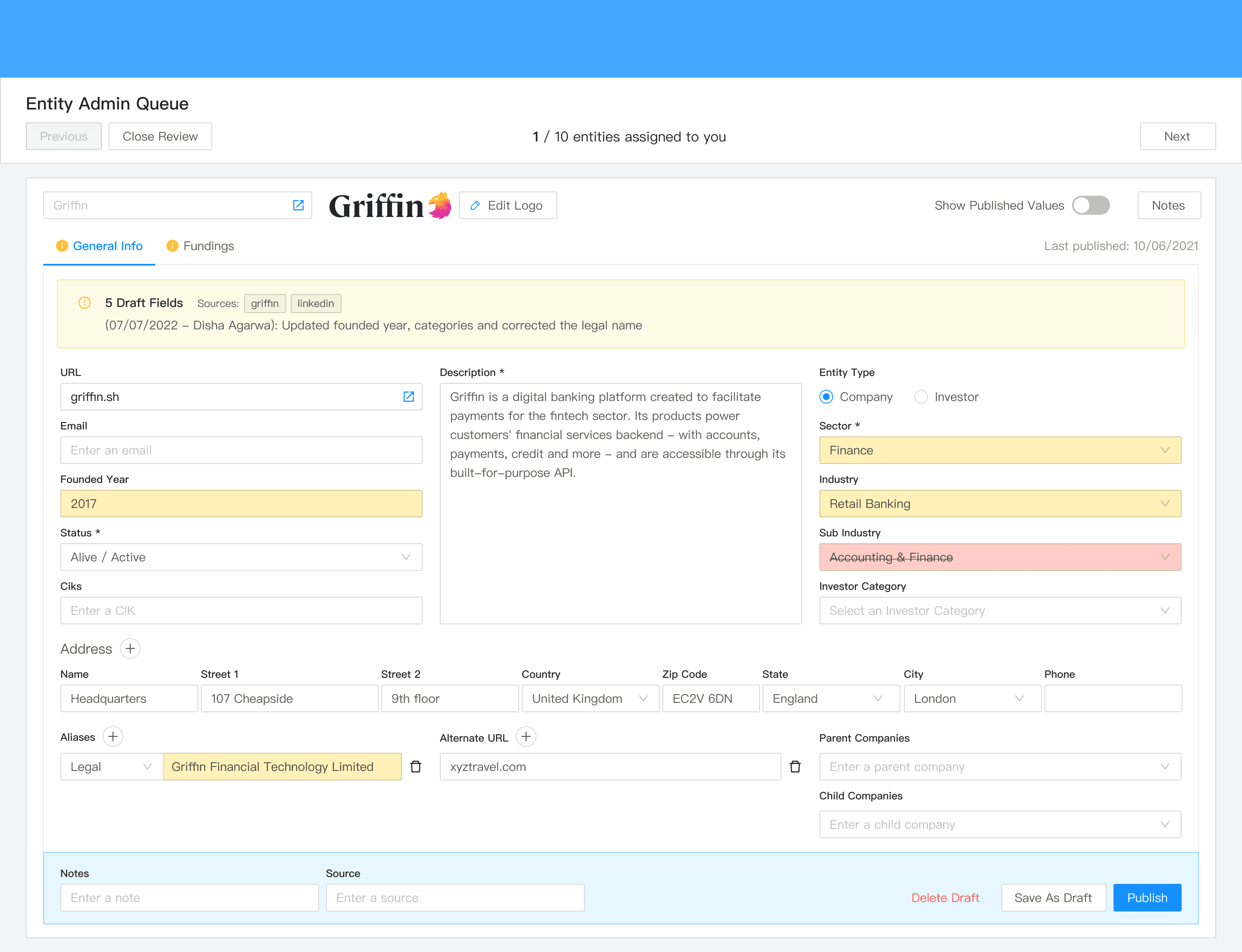
Review workflow with the ability to cycle through entities assigned to you instead of opening separate tabs.
Field-level highlighting.
Notes attached to data submission and QA.
Source article references alongside the form.
Side-by-side comparison of draft and original values.
With Sketch+InVision (this was 2022), I built an interactive prototype covering the full vendor-to-QA flow:
Usability Testing
I ran task-based testing with the same five participants from the research phase (given that these were the only 5 that would do QA in the short term). The goals mapped to the design each of the design decisions we had made:
Research Questions
Outcome
Do users understand draft vs. publish?
Yes
Do they understand how much data is in the queue?
Yes
Can they work through the queue intuitively?
Yes
Are notes helpful?
Not Sure
Is field highlighting helpful?
Yes
Can they compare draft and published values?
Yes, but they were primed for it
Key Findings
The bottom action bar implied bulk publish. Users expected the publish button to apply across all tabs of the entity rather than just the current one.
We didn't differentiate visually between New and Updated data. The context would change how a QA associate approach their work.
Auto-advancing was jarring. Sending users straight to the next profile with no acknowledgment of what they'd just done felt abrupt.
What They Liked
"The workflow and highlighting helps me move through profiles more quickly.” Having everything in one place made the process much smoother.
The summary of work of the reviewer helped center the QA associate around what they needed to review.
Show Published Values was very useful in determining why the Reviewer had updated certain fields.
Having Tab level icons to indicate which had been updated was very helpful.
Outstanding Questions
Our existing users are very familiar with our data and process, so will the intuitiveness of the prototype extend to new users?
Notes overlapped with highlighting in some cases; when do you need both?
Were sources redundant in General Info, where the data sources are more standardized?
How much will this add to the inital reviewers workflow?
Iterations going into build
Need to give more explicit feedback when moving to the next profile.
Visual differentiation between new data and changed data.
Sources links needed more prominence.
Technical Tradeoffs
Before going into development we had to make some hard decisions about what would make it into the sprints:
Research had shown us that Notes were not essential for every request, and for engineering they would add complexity to the implementation. Instead we built a Notes section in the profile where the reviewer could leave any relevant research details. It was not as embedded into the process as I would have liked, but it was functional.
The queue detail view was deemed non-essential in scoping, and was cut first from initial sprints. Bringing us up from 1 tab to 2 tabs. I was frustrated, but understood the resourcing constraint. I was hoping to add it to a later sprint, but ultimately it was never built.
Show Published Values was deemed too difficult to implement, but we were able to rework this into a simpler change audit modal. That enabled the internal team to see how data had updated over time.
The rest of the prototype was mostly implemented as it was designed.
Outcomes
The drafts system shipped and the impact was substantial:
Over 100% throughput of data through the queues. The team cleared the existing backlog and kept pace with new incoming entries.
Huge costs saving. While it's hard to estimate the exact cost savings of this project, leadership estimates that the cost of the new processing is saving in the $100,000s yearly.
The internal data team shifted upstream. Vendors took on raw input work. The internal team focused on quality, edge cases, and high-profile rounds.
Resourcing shift. The internal data team didn't have to put all their resourcing towards the news queue, and could distribute the resources to other queues. The assigned members could operate as reviewers and QA leads rather than primary data entry. Going from spikes of assigning 17 people to the queue to only needing 6.
Google Sheets retired as the QA mechanism. All review work moved into the platform, giving us better access control, audit trails, and security around customer-facing data.